Learn which organization option to select when you’re creating your RallyUp account.
When you create your RallyUp account, you’ll be asked what kind of organization or cause you’re fundraising for:
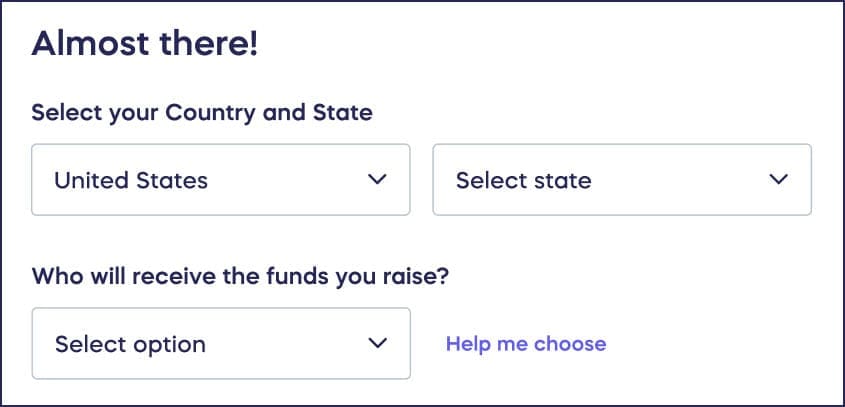
You’ll be presented with different options depending on whether you’re fundraising within or outside of the United States. This information is used to verify your organization’s identity, build donor trust, and determine which platform features are available to your account.
What types of U.S. organizations can fundraise on RallyUp?
What are registered 501(c) nonprofits?
501(c) nonprofits are officially registered with the IRS and are often tax-exempt. Religious organizations also have 501(c) status.
If you select this option when registering your account, we’ll ask for your EIN so we can verify your nonprofit status with the IRS database during the verification step of your account setup. If RallyUp is unable to verify your status automatically, see What if RallyUp can’t verify my organization’s status? below for next steps.
What are not-for-profit groups and organizations?
Some organizations do not have official 501(c) status, but are still focused on charitable causes instead of collecting profits. Examples include parent-teacher organizations, sororities and fraternities, youth sports programs, and other community groups.
If you’re not sure whether your organization is a registered 501(c), we suggest selecting this option when you first register your account. You can always update this information later.
What if RallyUp can’t verify my organization’s 501(c) status?
There are several reasons RallyUp may not be able to automatically verify your organization’s 501(c) status during the verification step of your account setup. Common reasons include a recently granted 501(c) status that hasn’t appeared in the IRS database yet, an EIN that doesn’t match IRS records, or outdated information in the IRS database.
If this happens, follow these two steps:
Step 1: Finish your account setup as a non-501(c) organization Go to Start Guide → Finish account setup. On the “Confirm your 501(c) tax exempt status” screen, uncheck the “My organization is a 501(c)” box and select Continue to Funds setup. Complete the remaining steps (connecting a payment processor and choosing a pricing option) so you’re not delayed in getting started.
Step 2: Request a manual review of your 501(c) status Once your account is set up, email approvals@rallyup.com with the following information:
- Your organization’s EIN#
- Your organization’s RallyUp ID# (found by clicking on your initials in the top right corner of the page)
- Documentation of your nonprofit status (e.g., Letter of Determination)
- A link to your organization’s profile on GuideStar
The approvals team will review your documentation and update your organization’s account accordingly. The approvals team typically completes manual reviews within one business day of receiving your documentation. If you have an upcoming Campaign launch, send your documentation to approvals@rallyup.com as soon as you finish account setup to avoid delays.
Religious organizations: If your organization is a church or other religious organization, you may not have a Letter of Determination or a GuideStar profile. This is expected — churches are automatically recognized as tax-exempt under federal law and are not required to formally apply for 501(c)(3) status. If this applies to your organization, you can submit alternative documentation in place of a Letter of Determination when you email approvals@rallyup.com.
Alternative documentation for churches and religious organizations may include:
- A signed letter from your attorney. The letter should confirm that your organization is recognized as tax-exempt under federal law.
- Other official documentation that confirms your organization’s religious or nonprofit standing.
Follow the same two steps listed above. When you email approvals@rallyup.com, include your EIN, your RallyUp Organization ID, and your alternative documentation in place of a Letter of Determination or GuideStar link.
Additional requirement for online raffles: If you’re seeking manual 501(c) verification in order to run online Raffles, the approvals team will ask you to confirm a legal attestation during the review process. This is required in addition to the documentation described in Step 2 above.
The attestation confirms that:
- Your organization is currently in good standing
- Your organization is legally permitted to run Raffles and Sweepstakes in your jurisdiction
- Your organization holds any licenses required to conduct Raffles
- You are authorized to act on behalf of your organization
The approvals team will send the attestation to you as part of the review. Your account will not be updated to reflect confirmed 501(c) status until you have confirmed the attestation.
Existing Raffle Campaigns: If you created a Raffle Campaign before your 501(c) status was manually confirmed, that Campaign will not automatically convert to an Online Raffle after your status is approved. You also cannot make this conversion yourself through your Campaign settings — it requires a support-side update. After your status is confirmed, contact RallyUp support and share the names of any Raffle Campaigns you need updated to Online Raffles.
What types of non-U.S. organizations can fundraise on RallyUp?
What are registered charities outside the U.S.?
Registered charities (sometimes also referred to as NGOs) are officially recognized by the government of the country or territory they’re based in. In some countries, such as the United Kingdom, Australia, and Canada, the organization will be assigned a charity number.
What are international not-for-profit groups and organizations?
Some organizations are not officially registered with the local government, but are still focused on charitable causes instead of collecting profits. This includes community groups such as youth programs, advocacy groups, animal shelters, and more.
In which countries is RallyUp available?
RallyUp is supported in the following countries:
- United States
- Canada
- United Kingdom
- Australia
- Austria
- Belgium
- Bulgaria
- Czech Republic
- Denmark
- Estonia
- Finland
- France
- Germany
- Greece
- Hong Kong
- Ireland
- Italy
- Japan
- Latvia
- Lithuania
- Luxembourg
- Netherlands
- New Zealand
- Norway
- Poland
- Portugal
- Romania
- Singapore
- Slovakia
- Slovenia
- Spain
- Sweden
- Switzerland
Frequently Asked Questions
Why does RallyUp ask about my organization type?
RallyUp asks about your organization type during account creation for verification purposes and to confirm your organization’s identity. This helps protect against impersonation and builds donor trust. Additionally, some platform features may vary based on organization type.
Can I change my organization type after creating my RallyUp account?
Yes, you can update your organization information later if needed. If you’re unsure about your organization’s status when first creating your account, you can select a general category and update it once you’ve confirmed your registration details.
What’s the difference between a 501(c) nonprofit and a not-for-profit organization?
A 501(c) nonprofit is officially registered with the IRS and has tax-exempt status, while not-for-profit organizations focus on charitable causes but may not have official IRS registration. Examples of not-for-profits include parent-teacher organizations, youth sports programs, and community groups.
I’m a church and don’t have a Letter of Determination. Can I still get my 501(c) status verified on RallyUp?
Yes. Churches are automatically recognized as tax-exempt under federal law and are not required to formally apply for 501(c)(3) status, so many churches do not have a Letter of Determination or a GuideStar profile. Complete your account setup as a non-501(c) organization first, then email approvals@rallyup.com with your EIN, your RallyUp Organization ID, and a signed letter from your attorney — or other documentation — confirming your tax-exempt status. The approvals team will review your submission and update your account accordingly.
How long does the manual 501(c) review take?
After the approvals team receives your documentation, they typically complete their review within one business day. To avoid delays to your Campaign timeline, email your documents to approvals@rallyup.com as soon as you finish account setup.
My 501(c) status was just manually approved. Why can’t I change my existing Raffle to an Online Raffle?
Raffle Campaigns created before your 501(c) status was confirmed cannot be converted to Online Raffles through your Campaign settings. This update needs to be made by RallyUp’s support team. After your status is confirmed, contact support and share the names of the Campaigns you need updated. The team will make that change on your behalf.
What’s the difference between registering, verifying, and finishing account setup?
Registering is the process of signing up on the RallyUp platform. Verifying your organization is one part of registration, where we confirm your organization’s identity. Finishing account setup includes completing all the steps needed to be approved for an account — this includes verification, connecting a payment processor, and choosing a pricing option.