Auction Gifts let non-winning bidders donate to your cause even when they don’t win items. Learn how to enable this feature, customize gift amounts, and maximize Auction revenue.
Auction Gifts are optional donations that bidders can pledge during checkout, which are only charged if they don’t win any Auction items they bid on.

This unique RallyUp feature allows nonprofits to receive contributions from all engaged Auction participants—not just the winners—potentially doubling or tripling fundraising results from a single Auction. You can customize the gift appeal message, set suggested donation percentages, and easily enable or disable this feature during Campaign Setup.
How Do Auction Gifts Work?
When you enable Auction Gifts for your RallyUp Auction, donors have the opportunity to set a one-time donation amount during the bidding process. This donation serves as a backup contribution that will only be charged if the donor doesn’t win any of the Auction items they placed bids on.
Key differences from regular donations:
Unlike general donations where supporters can give anytime regardless of Auction results, Auction Gifts are conditional—they’re only processed when a bidder loses all their Auction items. This creates a unique psychological incentive: bidders feel good knowing their participation supports your cause even if they’re outbid.
Auction Gifts are completely optional. Donors can participate in your Auction and place bids without setting an Auction Gift amount. The feature simply provides an additional giving opportunity during checkout.
Setting Up Auction Gifts
Enable Auction Gifts
- Go to Account Navigation in the left menu and select Campaigns.
- If you have chosen a list view, click on the Campaign title. If you have chosen a grid view, click on the Campaign image.
- Select Campaign Setup.
- Go to Auction in the timeline at the top.
- Scroll down to Optional settings and select Show optional settings.
- Scroll down to Allow bidders to give Auction Gifts and click the toggle to move it to the right (enabled position):

Customize the Auction Gift Appeal Message
You can personalize the message that appears during checkout when donors are asked about Auction Gifts:
- Go to Customize the Auction Gift appeal that displays in Checkout.
- Use the text box to write a custom message that resonates with your supporters:
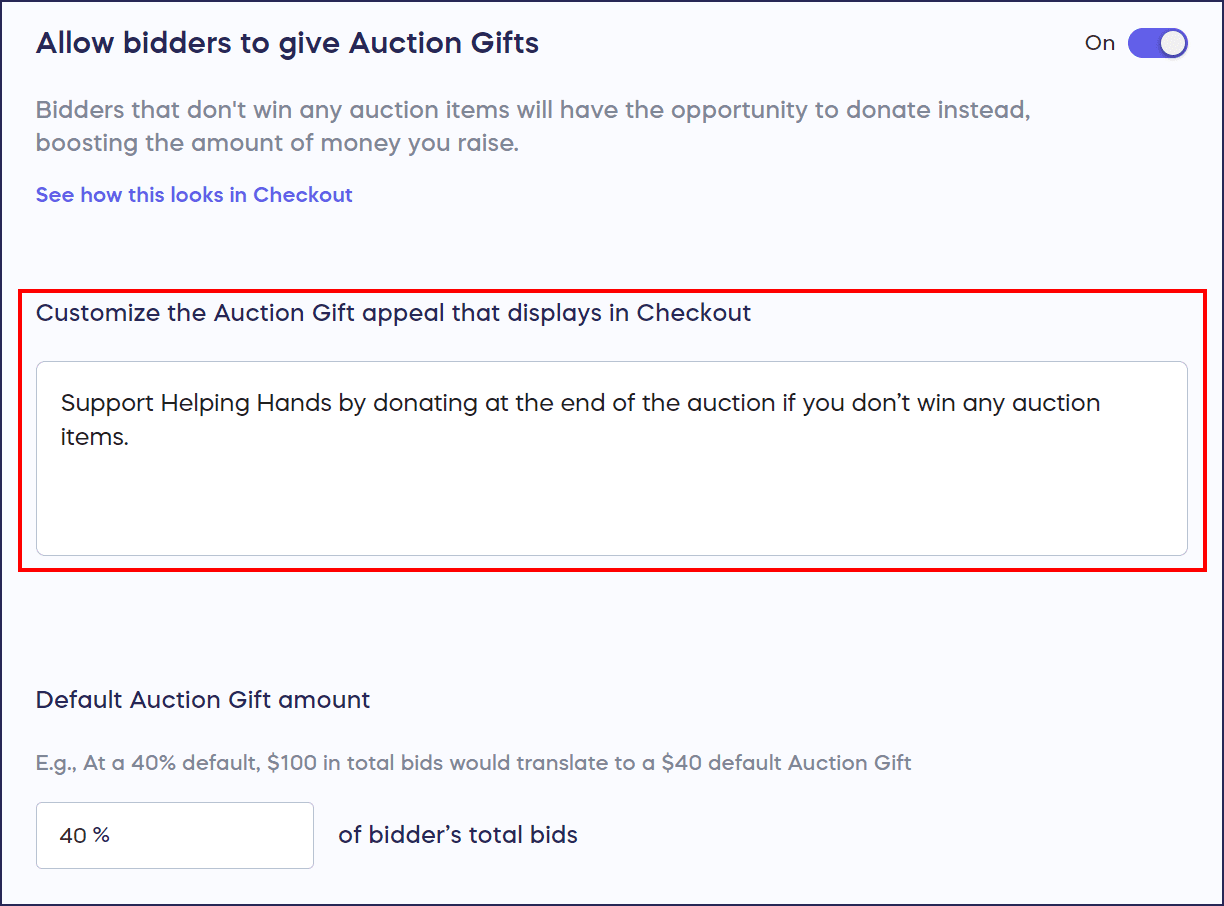
- If you’re satisfied with the default message, skip this step
Example custom messages:
- “Even if you don’t win tonight, your gift will help us reach our goal of [specific impact]”
- “Support our mission with a gift, win or lose!”
- “Every contribution makes a difference—consider adding an Auction Gift to your bid”
Set the Default Auction Gift Amount
RallyUp automatically calculates a suggested Auction Gift amount based on the bidder’s total cart value:
- Go to Default Auction Gift amount.
- Enter your preferred percentage (default is 40%).
- This percentage is applied to the total of all bids in the donor’s cart.
How it works: If your default Auction Gift amount is set to 40% and a donor places a $100 bid, they’ll see a suggested Auction Gift of $40 during checkout. Donors can adjust this amount higher or lower, or choose not to give an Auction Gift at all.
Disabling Auction Gifts
If you prefer not to ask bidders for Auction Gifts:
- Scroll down to Allow bidders to give Auction Gifts.
- Click the toggle to move it to the left (disabled position):

What Happens When Bids Are Canceled?
RallyUp handles Auction Gift cancellations automatically based on bid status:
If all of a donor’s bids are canceled: The associated Auction Gift is automatically canceled as well.
If only some bids are canceled: When one or a few bids are canceled but other bids remain active, the Auction Gift stays in place. This ensures the donor’s contribution intention is honored if they still have active bids that might not win.
Why Auction Gifts Increase Fundraising
Traditional Auctions only generate revenue from winning bidders—typically a small percentage of total participants. Auction Gifts unlock the fundraising potential of all non-winning bidders, dramatically expanding your donor base from a single Auction event.
The impact: In most Auctions, 70-90% of bidders don’t win items. By enabling Auction Gifts, you create an opportunity to receive donations from this large group of engaged supporters who are already invested in your cause.
Flexible donor control: Bidders can set or change their Auction Gift amount when they place or update bids. This flexibility empowers donors to give amounts that feel comfortable while staying engaged with your Auction.
Simplified reporting: All Auction Gifts appear in your standard Auction reports alongside bid information, making it easy to track both Auction revenue and supplemental donations in one place.
Frequently Asked Questions
What is the difference between Auction Gifts and regular donations?
Auction Gifts are conditional donations that only process if a bidder doesn’t win any Auction items they bid on. Regular donations can be given anytime regardless of Auction participation or outcomes. Auction Gifts are specifically designed to engage Auction participants who don’t win.
Can donors still bid without giving an Auction Gift?
Yes, Auction Gifts are completely optional. Bidders can participate fully in your Auction, place bids, and increase bids without ever setting an Auction Gift amount. The feature is offered as an additional giving opportunity but is never required.
When are Auction Gift amounts charged?
Auction Gifts are charged after the Auction ends, and only if the donor didn’t win any of the items they bid on. If they win at least one item, their Auction Gift is not charged. Payment processing happens automatically through RallyUp’s system.
Can I suggest different Auction Gift amounts for different items?
The default Auction Gift percentage applies to the total value of all bids in a donor’s cart, not individual items. However, you can adjust the global percentage to align with your fundraising goals and donor capacity. Donors always have the ability to customize their Auction Gift amount during checkout.
What happens if I cancel some but not all of a bidder’s bids?
If you cancel only some of a bidder’s bids while other bids remain active, the Auction Gift will not be canceled automatically. The Auction Gift only cancels when all of a bidder’s bids are canceled, ensuring consistent logic: as long as they have active bids that might not win, the gift pledge remains.
Will donors see how much others are giving as Auction Gifts?
No, Auction Gift amounts are private between the donor and your organization. Donors can only see their own Auction Gift pledge, and these amounts don’t display publicly on your Auction page.
How do I track Auction Gifts in my reports?
Auction Gifts appear in your standard Auction reporting alongside all other Auction data. You can see which donors pledged Auction Gifts, the amounts pledged, and which gifts were ultimately charged after the Auction concluded.
Getting Started
Ready to maximize your Auction fundraising with Auction Gifts? Simply customize your appeal message and suggested donation percentage to align with your fundraising goals.
For more information about running successful charity Auctions, explore these related guides:
Understand Auction Bidding Styles
Need Help?
Our support team is available via chat on our website during business hours. Click the purple message button at the bottom right of your screen. You can also search our Knowledge Base for detailed how-to articles and answers to common questions.