Learn why a donor’s payment may fail and how to reprocess the payment.
A donor’s credit card can fail for a number of reasons, including but not limited to:
- The card limit was reached before the transaction was charged
- The card expired between when a donation/bid/pledge was placed and when the transaction was charged
- The card was frozen due to loss or theft
If this happens, both you and the donor will receive an email notification that includes options for reprocessing the payment.
What happens when a donor’s payment fails?
If a donor’s transaction fails, they will receive an email from RallyUp informing them that their donation did not reach the organization:

How can donors resubmit their donation?
- In the notification email sent from RallyUp, click on Update Information and Complete Payment.
- To retry the same payment method, select SUBMIT PAYMENT*.
- To try a new payment method, go to Please enter your card information, select EDIT, enter the information for the new card, and select SUBMIT PAYMENT*:
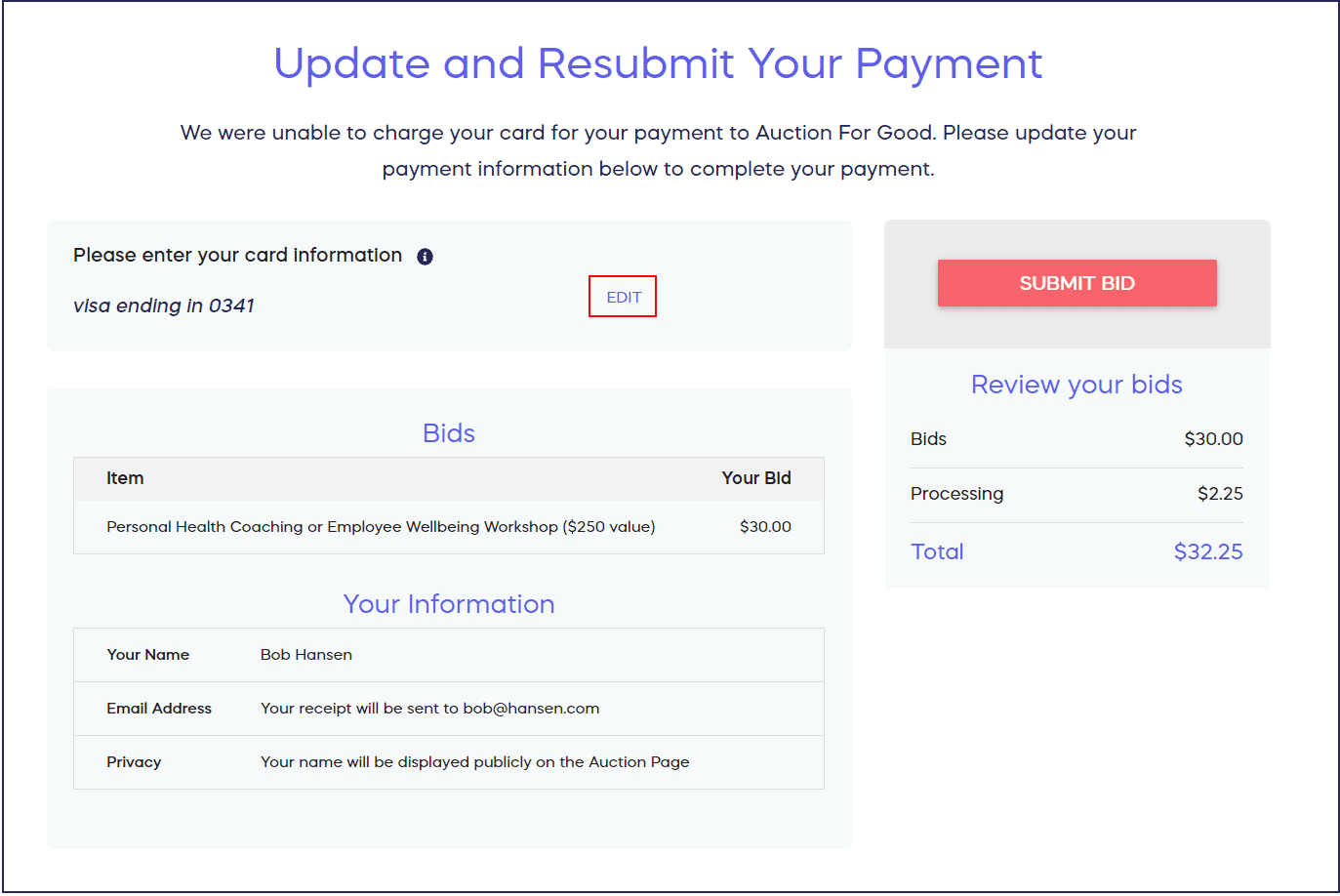
*Terminology may differ according to Campaign settings.
How do I reprocess a failed payment as a Campaign organizer?
If a transaction fails, the Campaign Organizer will also receive an email notification of the failed payment(s):
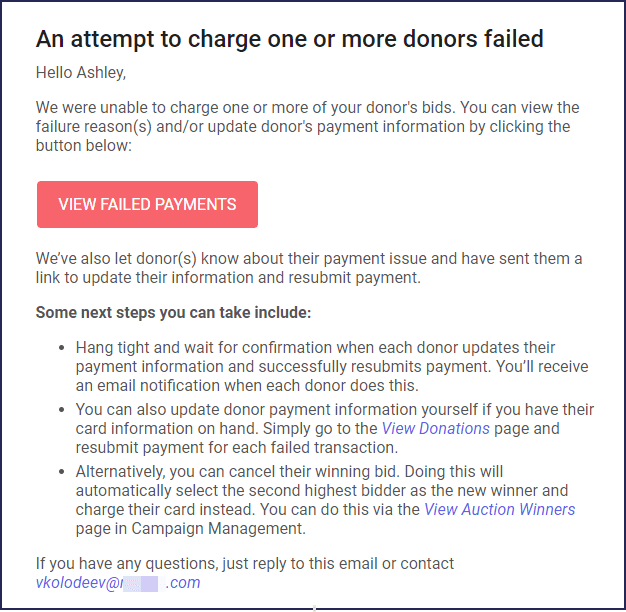
How can I resubmit the donation on the donor’s behalf?
- Select VIEW FAILED PAYMENTS in the email or go to View Donations in your Campaign Management Menu.
- Under the Status column, filter for failed payments.
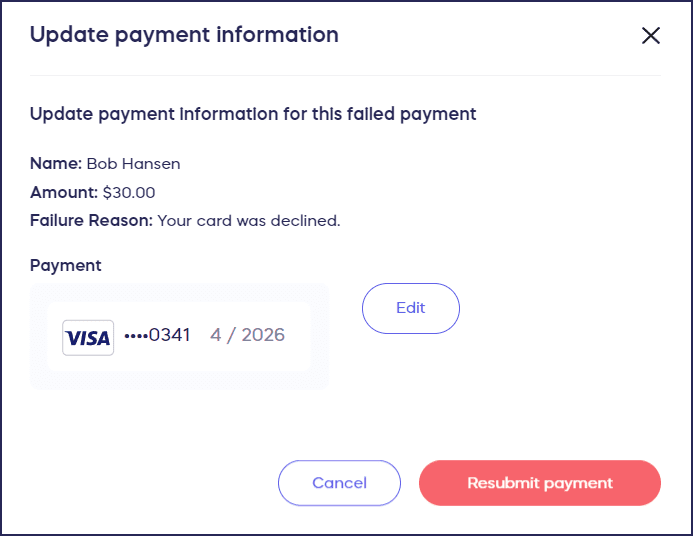
- Hover your mouse over the donation you want to resubmit. Click on the three-dot menu on the right, then select Update Payment Information:

- To retry the same payment method, select Resubmit payment.
- To try a new payment method, select Edit, enter the information for the new card, then select Resubmit payment:
How do I remind donors about their failed payments?
If you want to remind your donors of the failed payment to encourage a resubmission, you can resend the failed payment notice whenever you need:
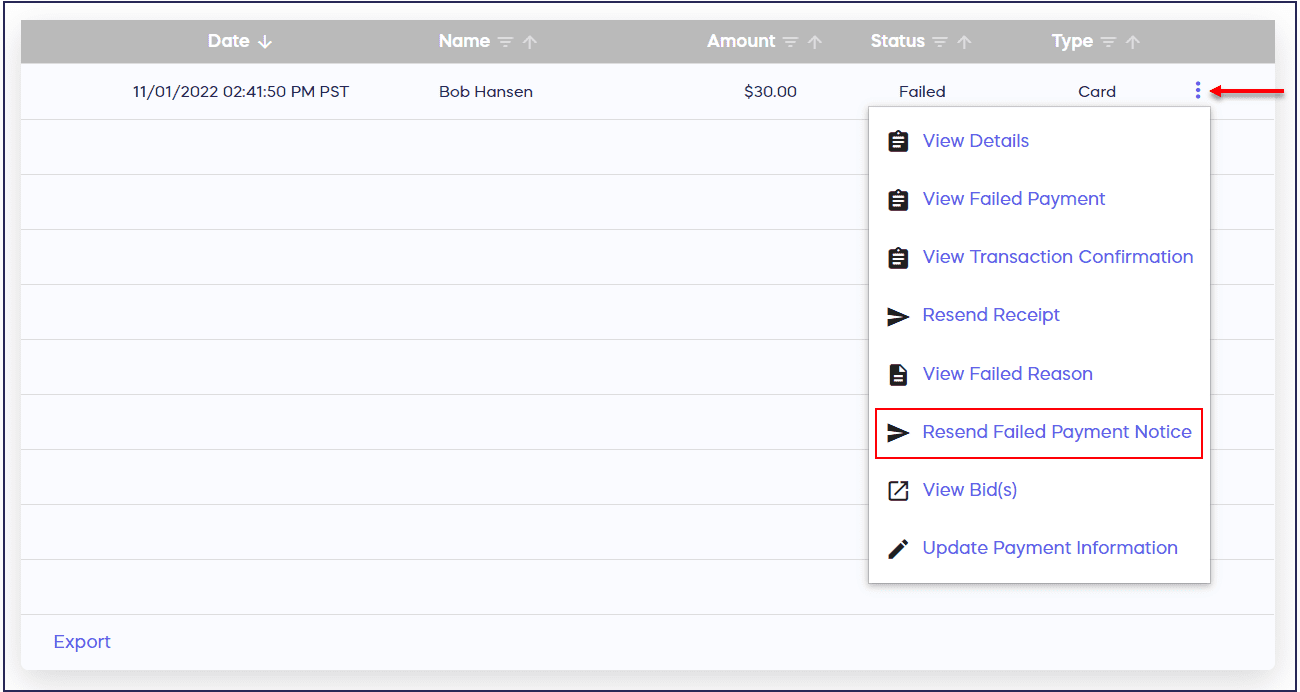
Keep in mind that this will only appear in the menu for payments with a ‘Failed’ status.
Frequently Asked Questions
What are the most common reasons for credit card failures?
Credit card failures typically occur when the card limit is reached, the card has expired, or the card has been frozen due to loss or theft. Payments may also fail if there are insufficient funds or if the bank flags the transaction as suspicious.
Will donors be notified automatically if their payment fails?
Yes, donors receive an automatic email notification from RallyUp when their payment fails. The email includes a link to easily update their payment information and resubmit their donation without starting over.
Can I reprocess a failed payment without contacting the donor?
You can retry the same payment method on the donor’s behalf, but you cannot enter new credit card information for them. If the original card continues to fail, you’ll need to ask the donor to provide updated payment details.
How long do donors have to resubmit a failed payment?
There’s no automatic expiration for resubmitting failed payments. However, it’s best to follow up promptly while the donor’s intent to give is still fresh, ideally within 24-48 hours of the failure notification.
Can I send multiple reminders about failed payments?
Yes, you can resend the failed payment notice to donors as many times as needed. This option appears in the three-dot menu next to any donation with a “Failed” status in your donation reports.
What if I can’t find a record of the failed payment in the View Donations report?
Sometimes, a donor’s transaction will fail because the transaction didn’t process successfully. In these cases, the donor won’t receive a confirmation email of the donation/purchase and the transaction won’t be listed in your records. The donor may need to check their bank account or you may need to check your Stripe/PayPal account to learn more. Please note that RallyUp cannot access the donor’s or your organization’s Stripe, PayPal, or bank account.
If you believe the transaction didn’t process successfully, you may ask the donor to try making their donation or purchase again. If they’re successful, they’ll receive a confirmation email and the transaction will appear in your records.