Simplify the fundraising process by allowing a Donor Advised Fund to collect and distribute funds on your behalf.
The majority of RallyUp users should set up a Stripe or PayPal account for the easiest and most direct way to receive the funds you raise. If your organization can’t set up a Stripe or PayPal account, Donor Advised Funds (DAFs) can collect and distribute funds on your behalf.
RallyUp has partnered with two DAFs: Pledge and GivingStream. You’ll be presented with one option or the other depending on the kind of organization you’re fundraising for.
What should I know about Donor Advised Fund fees and requirements?
- Both Pledge and GivingStream charge fees in exchange for their services. RallyUp does not receive any portion of the fees charged by Pledge or GivingStream.
- If your Campaign uses Flex pricing, a Platform Fee will also apply.
- Flex pricing offers a variety of ways to share fees with donors and offset costs: How-to: Pass Campaign and Donation Page Fees on to Donors.
- Campaigns using a DAF are not eligible for Stripe or PayPal’s discounted nonprofit payment processing rate.
What is Pledge and how does it work?
You’ll be offered Pledge as a funding option if you’re fundraising for one of the following organizations:
- U.S. registered 501(c) organizations
- Vetted non-U.S. charities included in the Pledge database
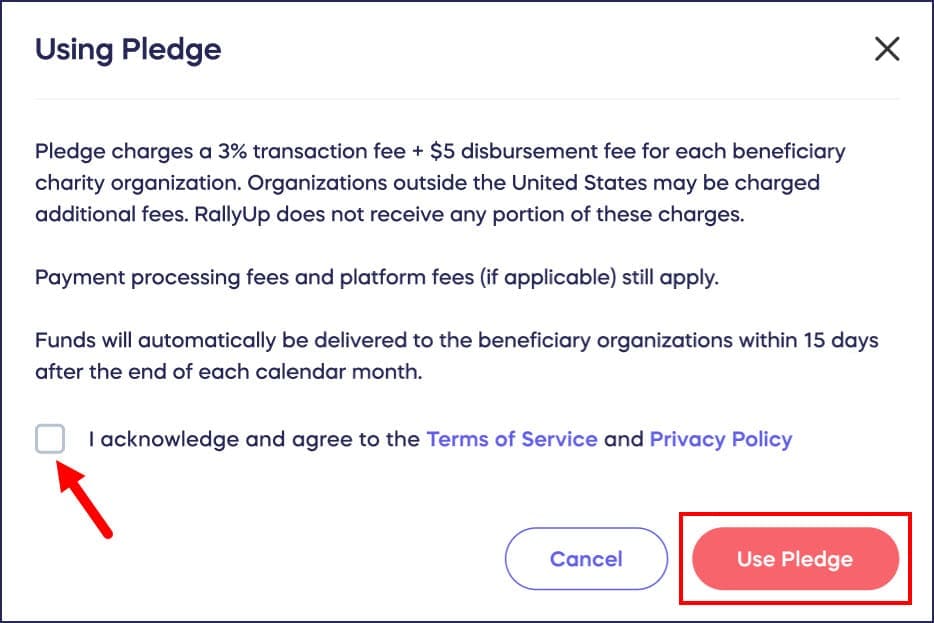
Pledge charges the following fees:
- 3% handling fee for US organizations (+5% for international organizations)
- $5 disbursement fee per beneficiary organization
- 2.9% + $0.30 payment processing fee (additional fees may apply)
Funds distribution: Funds will automatically be delivered to the organization(s) within 15 days of the end of each calendar month. Pledge can issue funds via paper check or ACH payment. You can contact Pledge at https://www.pledge.to/contact.
How do I set up Pledge as my funding option?
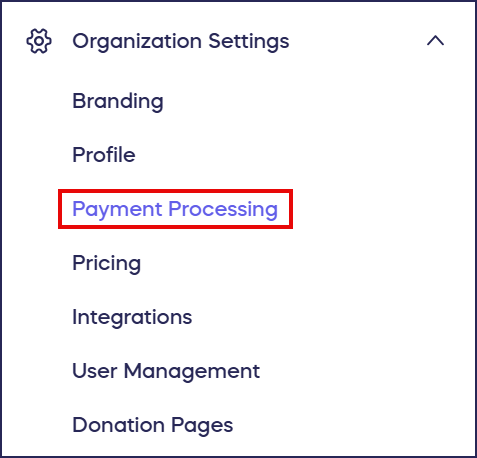
- Go to Organization Settings in the left menu and select Payment Processing:
- Scroll down to Alternative options and select Use Pledge (if your organization qualifies to use Pledge, you’ll automatically see it as a payment option):

- Read the disclaimer and check the acknowledgment box, then select Use Pledge:
What is GivingStream and how does it work?
If you’re fundraising for a U.S. charity organization that’s not registered in Pledge’s database, you can apply to use GivingStream. At this time, non-U.S. organizations are not able to use GivingStream.
GivingStream charges the following fees:
- 3% handling fee
- $1.79 disbursement fee per beneficiary organization
- 2.2% +$0.30 payment processing fee (additional fees may apply)
Funds distribution: GivingStream will be automatically notified when your Campaign ends. Funds will then be held for 90 days before disbursement to account for canceled payments. GivingStream issues funds via paper check. If you need to contact GivingStream, you can email them at support@givingstream.io.
Note: Raffles and Sweepstakes using GivingStream have a $10,000 fundraising limit.
How do I apply to use GivingStream?
- Go to Organization Settings in the left menu and select Payment Processing:
- Scroll down to Alternative options and select Apply to use GivingStream (if your organization qualifies to use GivingStream, you’ll automatically see it as a payment option):

- Fill out the request form and select Submit request when finished. GivingStream’s customer service team will contact you as soon as possible with next steps.
Frequently Asked Questions
What organizations are eligible to use Pledge?
Pledge is available to U.S. registered 501(c) organizations and vetted non-U.S. charities included in the Pledge database. If your organization qualifies, you’ll automatically see Pledge as a payment option in your settings.
What’s the difference between Pledge and GivingStream?
Pledge serves registered 501(c) organizations and certain international charities, while GivingStream is available for U.S. charity organizations not registered in Pledge’s database. They have different fee structures and disbursement timelines, with Pledge distributing monthly and GivingStream holding funds for 90 days.
How long does it take to receive funds through Donor Advised Funds?
Pledge automatically delivers funds within 15 days of the end of each calendar month via paper check or ACH payment. GivingStream holds funds for 90 days after your Campaign ends before disbursement via paper check to account for canceled payments.
Are there fundraising limits when using Donor Advised Funds?
Yes, Raffles and Sweepstakes using GivingStream have a $10,000 fundraising limit. Pledge does not have this restriction, though both services charge handling fees, disbursement fees, and payment processing fees for their services.
Can I use Donor Advised Funds if I have a Stripe or PayPal account?
While you can choose Donor Advised Funds, most organizations should use Direct Funds through Stripe or PayPal for faster processing, lower fees, and eligibility for nonprofit payment processing discounts. Choose DAFs only if you cannot set up Stripe or PayPal.