Update your RallyUp account to match your organization’s nonprofit discount from Stripe or PayPal.
When you connect your organization’s Stripe or PayPal account, we ask you to enter the credit card processing rate for that account. Both Stripe and PayPal offer 501(c) organizations a nonprofit discount on payment processing fees. If your organization qualifies for this discount, you can update your RallyUp account settings to match.
What do I need to know about nonprofit processing rates?
- Only registered US 501(c) organizations are eligible for Stripe’s or PayPal’s nonprofit discount.
- If you believe you qualify for this discount but haven’t yet received it, you can contact Stripe or PayPal to apply for this discount.
- Updating your card processing rate in RallyUp doesn’t affect what Stripe or PayPal charges you. This setting only ensures that any reports you run on RallyUp will calculate fees correctly, so you can predict exactly how much of the funds you raise will go towards these fees.
How do I update my credit card processing rate?
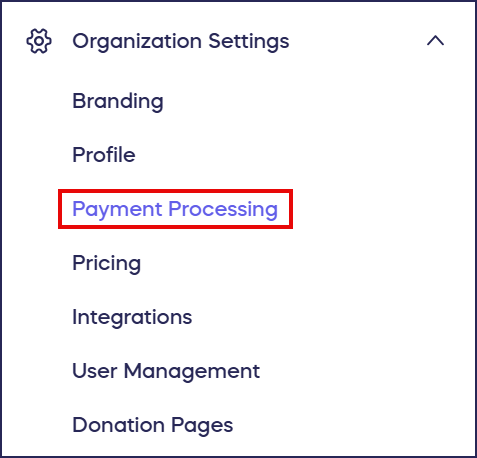
- Go to Organization Settings in the left menu and select Payment Processing:
- Scroll down to Enter your card processing rate:
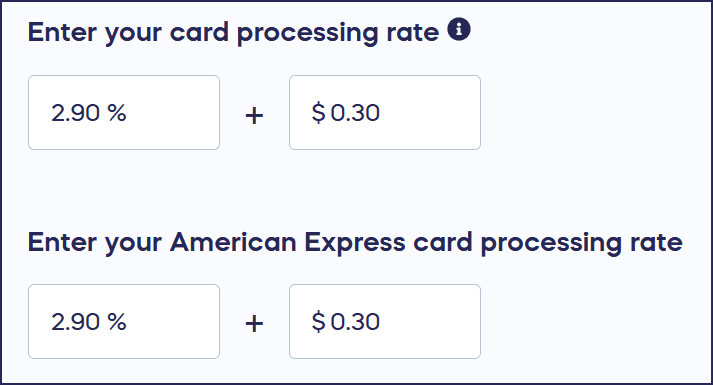
- Update the percentage and cent fields to match the rate you receive through Stripe or PayPal. If you’re using Stripe, you’ll need to enter a separate rate for American Express cards.
- Select Save.
Frequently Asked Questions
What is the nonprofit discount for credit card processing?
Stripe and PayPal offer discounted payment processing fees specifically for registered US 501(c) organizations. This nonprofit discount reduces the percentage and per-transaction fees you pay when accepting donations through credit cards.
Does updating my processing rate in RallyUp change what Stripe or PayPal charges me?
No, updating your card processing rate in RallyUp does not affect what Stripe or PayPal actually charges you. This setting only ensures that reports you run on RallyUp calculate fees correctly so you can accurately predict processing costs.
How do I qualify for the nonprofit discount from Stripe or PayPal?
Only registered US 501(c) organizations are eligible for the nonprofit discount. If you believe you qualify but haven’t received it yet, contact Stripe or PayPal directly to apply for the discount on their platforms.
Why do I need to enter a separate rate for American Express cards?
If you’re using Stripe, American Express cards have different processing rates than other credit cards. You’ll need to enter a separate rate for American Express to ensure accurate fee calculations in your RallyUp reports.
Where can I find my current processing rate from Stripe or PayPal?
You can find your processing rate by logging into your Stripe or PayPal account and reviewing your account settings or fee structure. Contact their support if you need help locating this information.