Play videos and presentations during your virtual fundraising event.
RallyUp lets you play pre-recorded content without interrupting your Livestream, giving you more options to engage your audience. Whether you want to showcase mission videos, play donor testimonials, share sponsor messages, or present slideshows, the screen sharing feature seamlessly integrates pre-recorded content into your live event. This capability is especially valuable for virtual galas, fundraising appeals, and Auction events where professionally produced content enhances your message and keeps viewers engaged between live segments.
How do I share pre-recorded content during my Livestream?
Sharing videos or presentations during your Livestream is straightforward using RallyUp’s screen sharing feature. You can stream content from video platforms like YouTube or Vimeo, or share files stored directly on your computer. Here’s how to do it:
- Below the Livestream video feed, select Share:
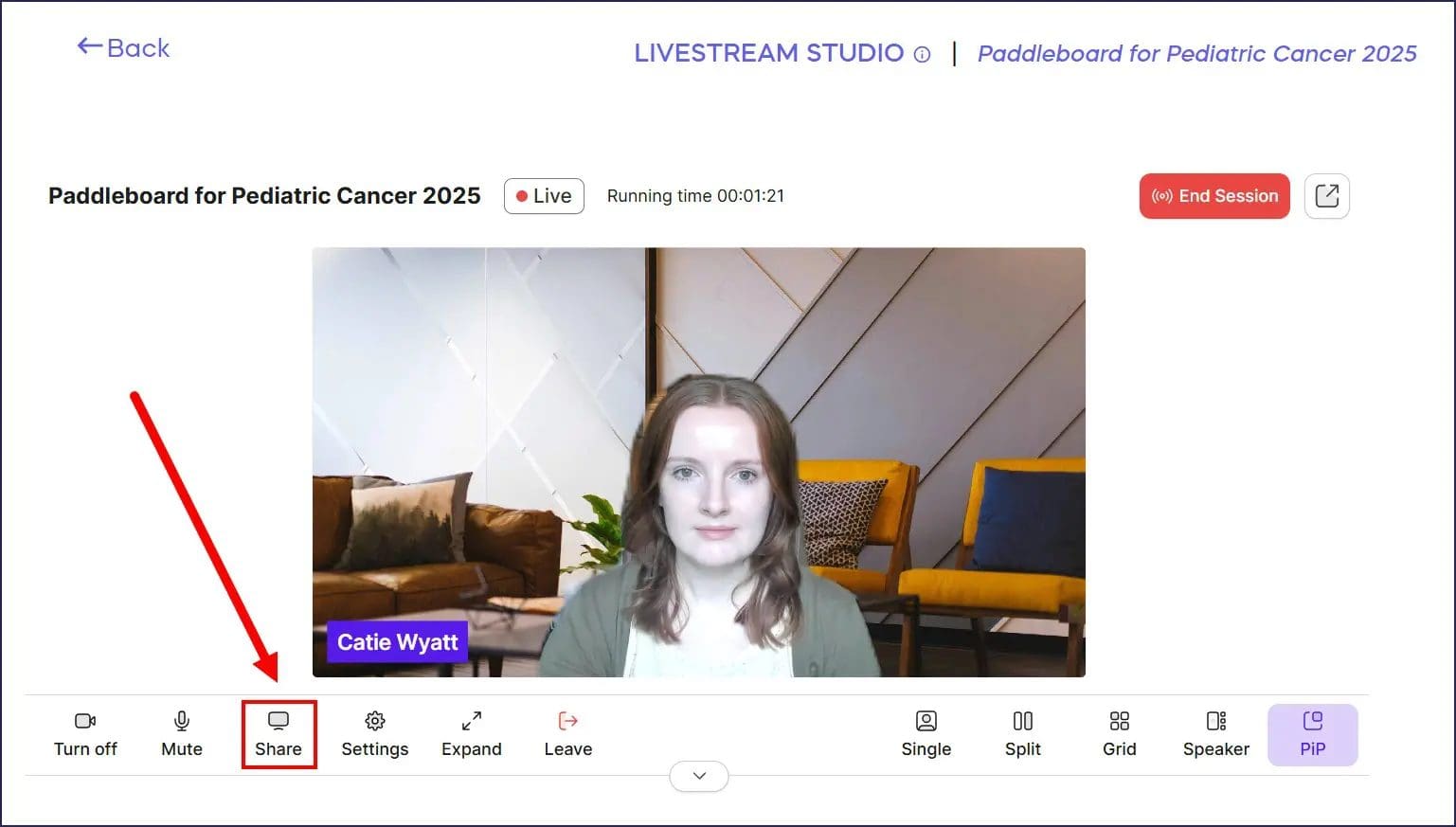
- You can share your browser tab, computer window, or screen:

To share a video from a streaming site like YouTube or Vimeo, we recommend sharing your browser tab. For content that hasn’t been uploaded to a streaming site, we recommend opening it on your device and then sharing your window.
- Once you’ve chosen your tab, window, or screen, select Share. Your content will automatically begin streaming to your Livestream audience.
- When you’re done, select Stop:
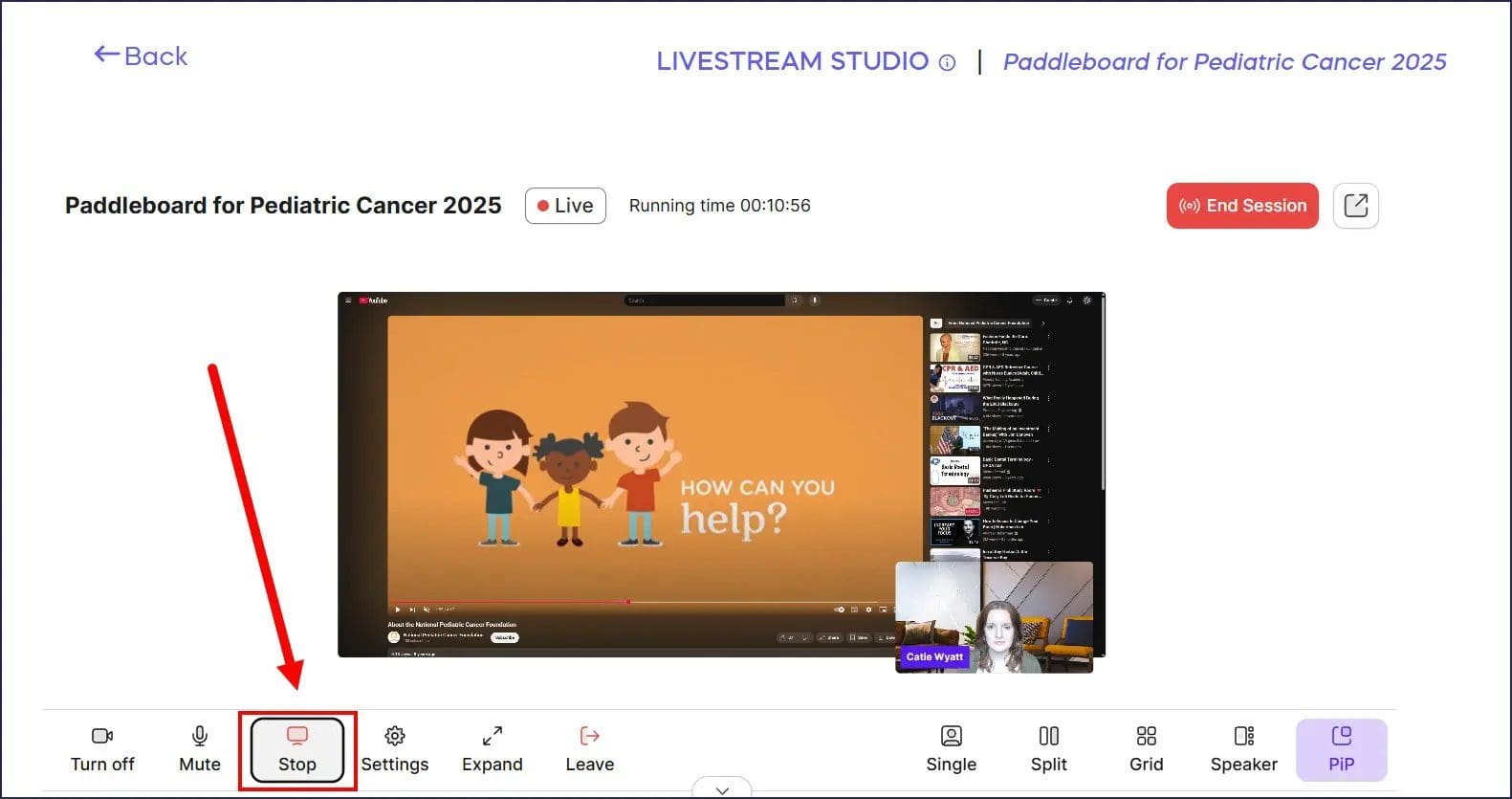
Remember that if you pause the video or change the volume as the presenter, these actions will affect what your viewers see and hear. The video will pause or the volume will adjust for your entire audience, so plan your playback controls accordingly.
What types of content can I share on my Livestream?
You can share virtually any content displayed on your computer screen during your Livestream. Common options include:
- Videos hosted on YouTube, Vimeo, or other streaming platforms
- PowerPoint or Keynote presentations
- Photo slideshows
- Mission impact videos
- Sponsor recognition reels
- Auction item showcases
- Donor testimonial compilations
You can also share your entire desktop to display multiple applications or switch between different content types during your event. The screen sharing feature works with any visual content you can display on your computer, giving you complete flexibility in how you structure your virtual fundraising event.
What’s the best way to prepare pre-recorded content?
For the smoothest playback experience, prepare your pre-recorded content well before your Livestream begins:
- If using streaming platforms like YouTube or Vimeo, upload your videos in advance and test playback on the exact browser and device you’ll use during the live event.
- Open all video links in separate browser tabs before starting your Livestream so they’re ready to share instantly.
- For locally stored files, organize them in a dedicated folder and queue up any presentations or videos in their native applications before going live.
- Test your audio levels during rehearsal to ensure pre-recorded content volume matches your live audio.
Having everything prepared and tested eliminates awkward pauses and technical difficulties during your actual event. Learn more about planning successful virtual events in Turn Your Fundraiser into a Live Virtual Event and discover how to Add Livestreaming to Your Fundraiser.
Frequently Asked Questions
Can I share audio-only content during my Livestream?
Yes, you can share audio-only content like music, podcasts, or voice recordings by sharing your browser tab or window where the audio is playing. Your audience will hear the audio through your Livestream even without video content. However, consider displaying a static image or text slide while audio plays to maintain visual engagement rather than showing a blank screen.
What happens to my camera feed when I share content?
When you share your screen, tab, or window, the shared content replaces your camera feed for viewers. They’ll see the pre-recorded content instead of seeing you on camera. Once you stop sharing, your live camera feed automatically returns to the screen. If you want to appear on camera while content plays, you’ll need to use a different setup or incorporate the video into your background rather than using screen sharing.
Can multiple presenters share content during the same Livestream?
Yes, any presenter with access to the Livestream Studio can share content when they’re onstage. Only one presenter can share content at a time—when one presenter starts sharing, any other active screen shares automatically stop. Coordinate with your co-presenters about who will share which content and when to avoid conflicts or confusion during the event.
Why isn’t my video playing smoothly when I share it?
Choppy or laggy video playback usually results from internet connection issues or computer performance limitations. Close unnecessary applications and browser tabs to free up system resources before your Livestream. Use a wired internet connection instead of WiFi when possible for more stable bandwidth. If streaming from platforms like YouTube, ensure the video fully loads or plays smoothly on your end before sharing it with your audience. Lower quality videos may stream more reliably than high-definition content if bandwidth is limited.
Can viewers hear my pre-recorded video’s audio?
Yes, when you share a browser tab or window containing video with audio, your audience will hear that audio through your Livestream. Make sure to share the correct tab or window, as sharing the wrong one may result in viewers seeing your video but not hearing its audio. Test audio playback during your rehearsal to confirm viewers can hear both your live microphone and any shared video audio clearly.
Should I share my browser tab, window, or entire screen?
Share your browser tab when playing videos from streaming sites like YouTube or Vimeo—this provides the cleanest presentation with the video content filling the viewer’s screen. Share a specific window when presenting PowerPoint slides or displaying a particular application, which prevents viewers from seeing other open programs or desktop clutter. Share your entire screen only when you need to switch between multiple applications or show your complete desktop. Tab sharing typically provides the best viewer experience for pre-recorded videos.