Discover the differences between an A-Thon and Peer-to-Peer Crowdfunding.
The term “pledge” can be used in two different contexts, which can sometimes cause confusion when setting up your Campaign. Understanding the difference between A-Thon pledges and Peer-to-Peer donations will help you choose the right Campaign type for your fundraising goals.
What is the difference between A-Thon pledges and Peer-to-Peer donations?
RallyUp uses the term “pledge” to refer to a per-unit-of-activity donation credited to an A-Thon Participant or Team. In an A-Thon, supporters pledge a specific amount for each unit of activity completed, such as one dollar for each lap walked or mile run:
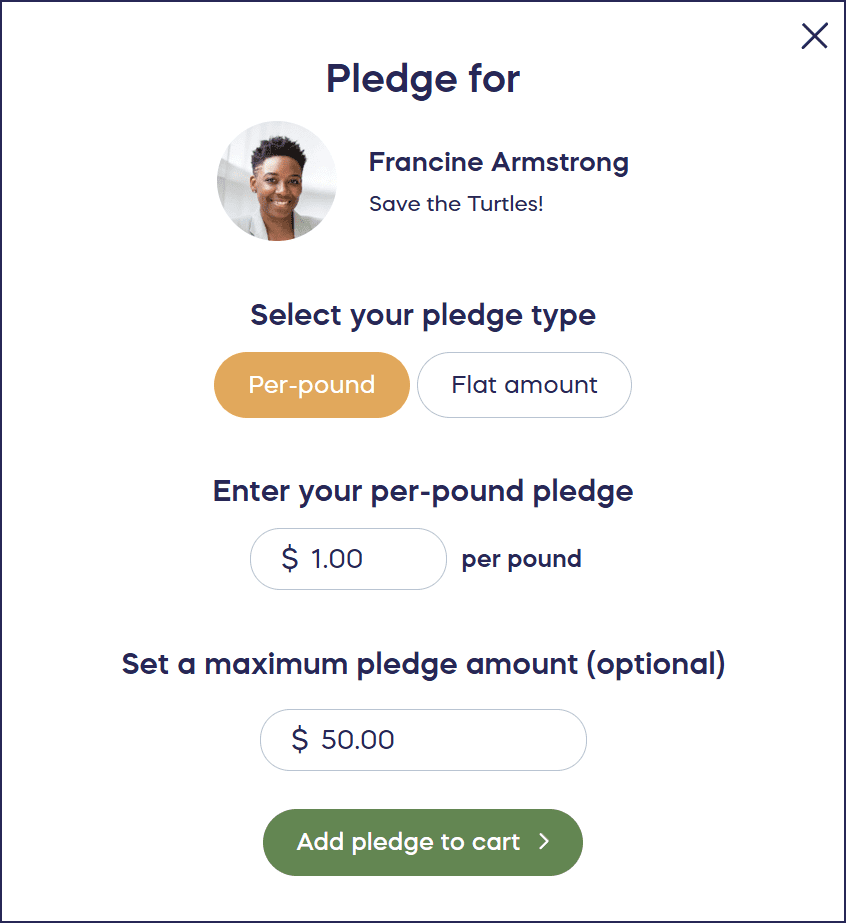
However, “pledge” is also commonly used to refer to one-time or recurring donations credited to Peer-to-Peer Participants or Teams. In Peer-to-Peer fundraising, supporters make standard donations and choose which Participant or Team to credit:
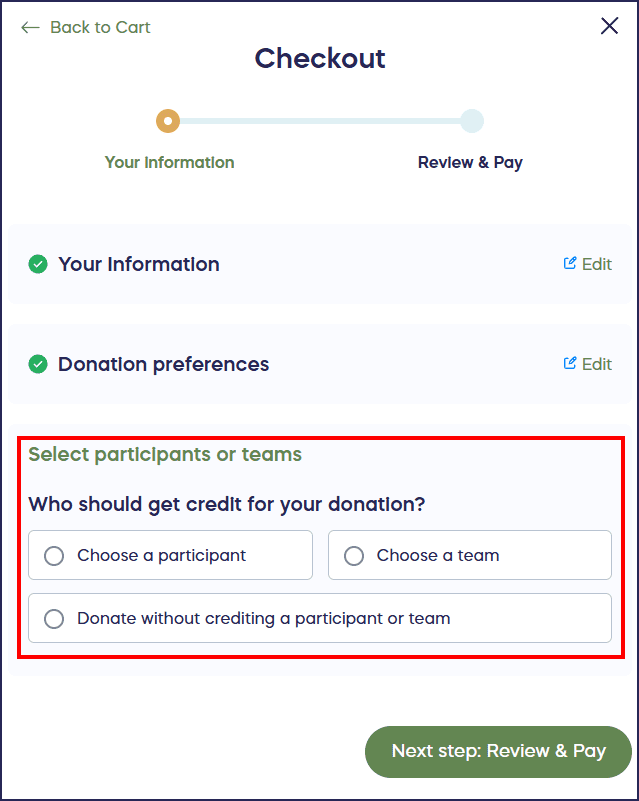
If you only want your Campaign Participants and Teams to get credit for one-time donations rather than per-activity pledges, we recommend enabling Peer-to-Peer on a Crowdfunding Campaign instead of adding an A-Thon.
How do I set up a Campaign with one-time donations instead of per-activity pledges?
To run a pledge-style Campaign with one-time donations, create a Crowdfunding Campaign and enable Peer-to-Peer fundraising. This allows Participants to receive credit for donations without the per-activity calculation that A-Thons require.
Participants can create Personal Fundraising Pages, share them with their networks, and supporters can make standard donations that credit specific Participants. This setup is ideal for Campaigns where you want the community engagement of Participant-based fundraising without tracking completed activities.
Learn more about Peer-to-Peer fundraising to see if this approach fits your Campaign goals.
When should I use an A-Thon instead of Peer-to-Peer?
Choose an A-Thon when your fundraiser involves Participants completing measurable activities like walk-a-thons, read-a-thons, or bike-a-thons. A-Thons work best when donors want to pledge based on Performance, such as dollars per lap or miles completed.
The per-unit pledge structure adds a competitive or motivational element that standard Peer-to-Peer donations don’t provide. Explore charity A-Thons to understand when this Campaign type is most effective.
What are the key differences between Peer-to-Peer and A-Thons?
Peer-to-Peer: Participants sign up to help spread the word about your fundraiser. When someone makes a donation or purchase, they can credit the Participant that sent them to your fundraiser. This works well for Campaigns focused on outreach and community building.
A-Thons: Participants sign up to complete units of a specific activity such as walking laps, and earn donations for each unit completed. For example, someone pledges one dollar for each lap their friend walks. This works well for activity-based fundraising events with measurable performance metrics.
The fundamental difference is that Peer-to-Peer credits Participants for bringing in supporters, while A-Thons credit Participants based on activities completed.
Frequently Asked Questions
Can I use Peer-to-Peer fundraising for personal causes?
No, Peer-to-Peer fundraising cannot be used to fundraise for personal causes. RallyUp is a fundraising platform exclusively for nonprofits and other registered charitable organizations. If you’re fundraising for a personal need, you’ll need to use a different platform designed for personal fundraising.
How do donors credit a specific Participant in Peer-to-Peer fundraising?
In Peer-to-Peer Campaigns, donors can credit a participant during the checkout process by selecting the Participant’s name from a dropdown menu. Alternatively, if Participants share their unique Personal Fundraising Page links, donations made through those pages automatically credit the correct Participant. This makes it easy for Participants to promote their individual fundraising efforts while still contributing to your overall Campaign goal.
Do Peer-to-Peer Participants need to create Personal Fundraising Pages?
Personal Fundraising Pages are optional in Peer-to-Peer Campaigns. You can enable or disable this feature based on your preferences. When enabled, Participants can customize their pages with personal stories, photos, and fundraising goals to engage their networks. When disabled, Participants are still listed in your Campaign and can receive credit for donations, but they won’t have individual pages to share. The choice depends on how much autonomy you want to give Participants in promoting the Campaign.
What happens if I accidentally set up an A-Thon but wanted Peer-to-Peer?
If you’ve already launched your Campaign with the wrong structure, you cannot simply convert an A-Thon to Peer-to-Peer or vice versa. You would need to create a new Campaign with the correct fundraising structure. To avoid this issue, carefully review the differences between Campaign types during setup. If you’re unsure which option is right for your fundraiser, contact RallyUp support for guidance before launching your Campaign.