Let donors choose between variations of an item such as color, size, and more.
When running an online Storefront, you may want to offer your donors the option to choose between different variations of a particular item, such as sizes, colors, styles, and more. This feature works perfectly for selling merchandise like t-shirts, hoodies, or any products where buyers need to select specific options. For example, if you want to sell t-shirts, you could let donors choose the size and color of the shirt. Size would be one variation type, and Color would be another. You can add as many options to each variation type as you like, giving donors complete control over their purchase preferences.
How do I add variations to a Storefront item?
Adding product variations to your Storefront items is straightforward and gives donors the flexibility to select exactly what they want. Follow these steps to set up variations:
- Go to Account Navigation in the left menu and select Campaigns.
- If you have chosen a list view, click on the Campaign title. If you have selected a grid view, click on the Campaign image.
- Select Campaign Setup.
- Go to Storefront in the timeline at the top and click on the item you want to edit or select Create an item.
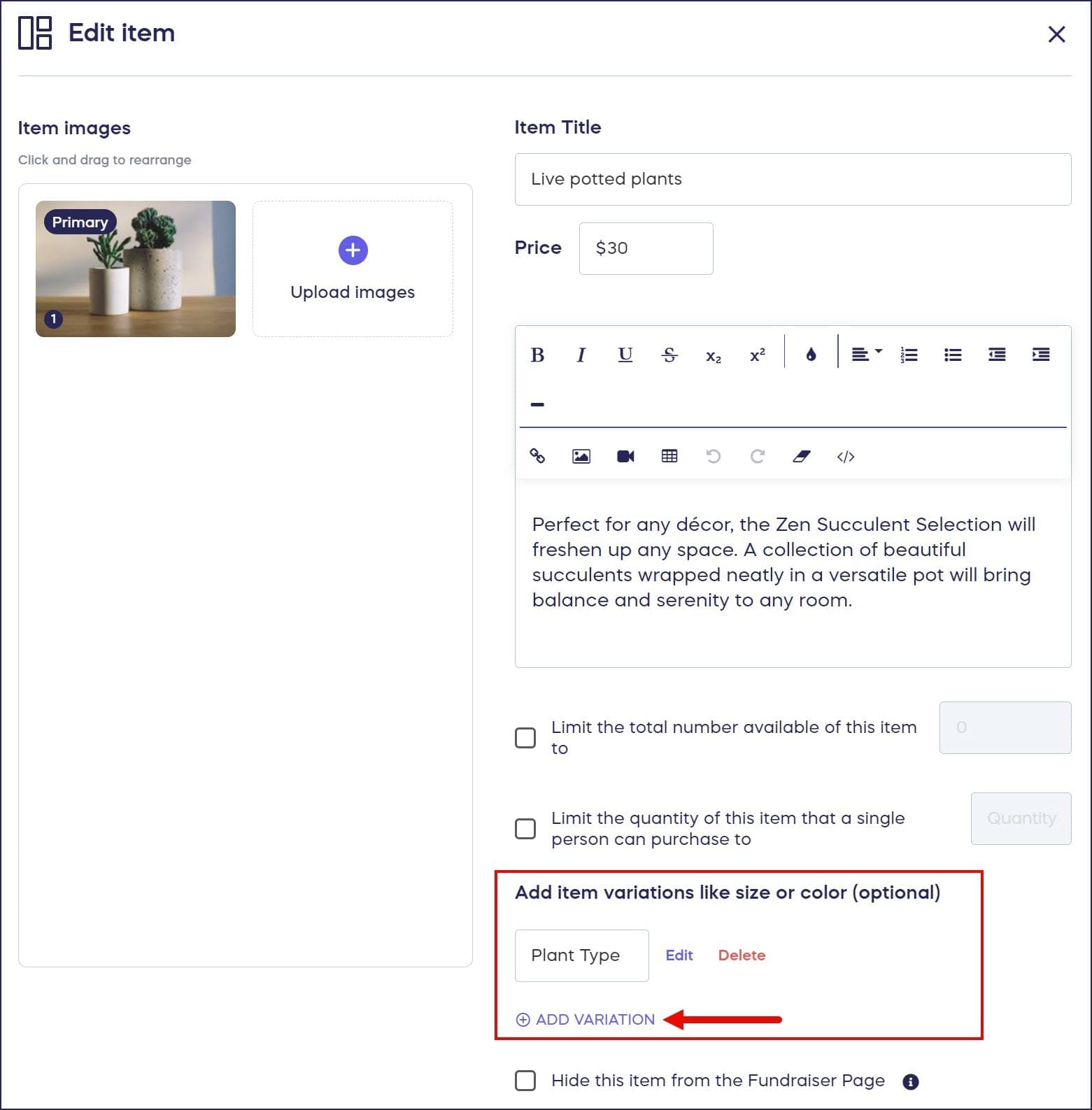
- Select ADD VARIATION:
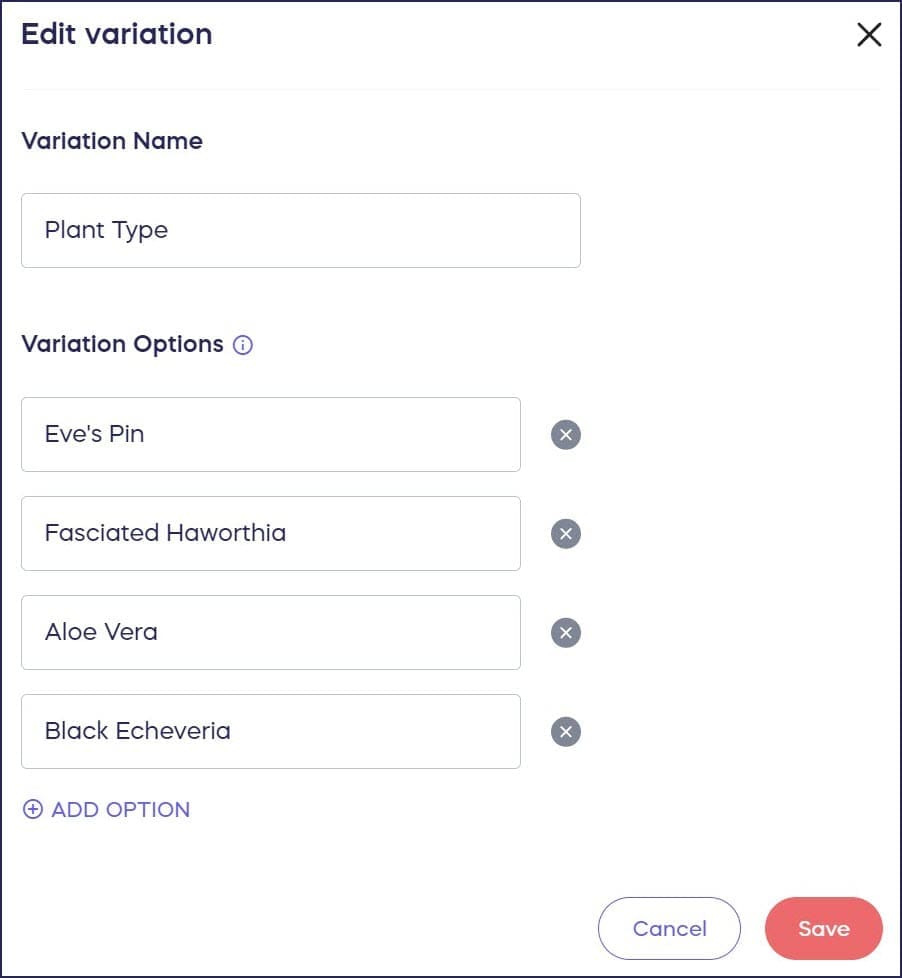
- Add the variation name and options you want to offer:
- Select Save.
What do donors see when purchasing items with variations?
Donors can select their preferred option from a dropdown menu when they purchase an item. The variation selections appear clearly during the checkout process, ensuring they can easily choose the exact specifications they want before completing their purchase. This creates a smooth shopping experience similar to commercial e-commerce sites:

What types of variations can I offer?
You can create variations for virtually any product attribute that requires buyer selection. Common variation types include size options like Small, Medium, Large, and Extra Large for clothing, color choices for items available in multiple colors, style variations such as short sleeve versus long sleeve, material options like cotton or polyester blends, and personalization choices like custom text or monogramming. Each variation type can include as many specific options as your inventory supports, giving you complete flexibility in how you present product choices to your donors.
Frequently Asked Questions
Can I add multiple variation types to a single item?
Yes, you can add multiple variation types to the same item. For example, a t-shirt could have both size and color variations, allowing donors to select both their preferred size and color before checkout. Each variation type operates independently, creating all possible combinations of the options you provide. Just click ADD VARIATION for each additional variation type you want to include.
Do variations affect inventory tracking?
Product variations work with RallyUp’s inventory management system. You can set quantity limits for your overall item or track inventory for specific variation combinations. This prevents overselling and automatically updates availability as donors make purchases. If certain size and color combinations sell out, those specific options become unavailable while others remain purchasable.
Can I charge different prices for different variations?
Currently, RallyUp’s variation system uses a single base price for the item regardless of which variation options donors select. All size, color, and style combinations for a particular item are sold at the same price. If you need to offer the same product at different price points, create separate Storefront items with unique pricing for each version.
What happens if I need to add more variation options after launching?
You can edit your Storefront item variations at any time during your Campaign, even after it’s live. Simply navigate back to Campaign Setup, access the Storefront item, and add additional variation options to existing variation types. New options become immediately available to donors. However, removing variation options should be done carefully if donors have already purchased those specific variations.
How do variation selections appear in my order reports?
When you export your Storefront order reports, each donor’s specific variation selections appear clearly in the order details. You’ll see exactly which size, color, or style each purchaser selected, making fulfillment straightforward. This detailed reporting ensures you can accurately pack and ship the correct items to each donor without confusion.
Should I use variations or create separate items?
Use variations when you’re selling essentially the same product in different configurations—like a t-shirt in multiple sizes and colors. Create separate Storefront items when products are fundamentally different, have significantly different prices, or require distinct descriptions and images. Variations simplify the donor browsing experience by consolidating similar products into a single listing rather than cluttering your Storefront with dozens of nearly identical items.