When creating an A-Thon or Peer-to-Peer Campaign, you can customize Participant* and Team* registration options you offer so that they’re only available for a limited time or only a certain number of people can register. These limitations create urgency and excitement that can significantly boost early registrations or revive participation during your Campaign, such as:
- Early bird specials
- Mid-campaign boosts
- Exclusive limited-entry opportunities
Registration options are only available when you select public registration and enable a Participant Center*—if you select private registration or decline to add a Participant Center, you won’t be able to create these customizable registration options for supporters to choose from.
*Terminology may differ according to Campaign settings.
When should I use limited-time registration options?
Limited-time registration works perfectly for generating momentum at specific points during your Campaign:
- If you’re seeking ways to generate excitement for a Campaign you’ve just kicked off, you might consider offering free or discounted registration for a limited time to attract early adopters and create buzz.
- If participation plateaus as your fundraiser progresses, you might offer a mid-campaign special for a limited time to re-engage potential Participants who haven’t yet committed.
- You can select start and end dates for when the registration option will be available—the registration option won’t show until the start date, and once the window has closed, it will no longer appear on your Campaign Page. This creates genuine scarcity that motivates people to register before missing the opportunity.
When should I use limited-quantity registration options?
Quantity limits also allow you to run specials to kick off your Campaign or revive enthusiasm as needed, but instead of limiting it to a window of time, you’ll select a maximum number of registrants allowed. This approach works especially well for creating exclusivity around premium registration tiers or special experiences, like the first 50 registrants receiving a special t-shirt or access to an exclusive pre-event gathering.
After the limit has been reached, the registration option will still appear on your Campaign Page showing it’s sold out, but the purchase option will no longer be enabled. This visibility maintains awareness of the special offer while demonstrating the demand and encouraging others to register for remaining options before they also sell out.
How do I add time or quantity limits to registration options?
Setting up limited-time or limited-quantity registration requires just a few additional settings during your registration option creation:
- Go to Account Navigation in the left menu and select Campaigns.
- If you have chosen a list view, click on the Campaign title. If you have chosen a grid view, click on the Campaign image.
- Select Campaign Setup.
- Go to Peer-to-Peer in the timeline at the top.
- Select Create Participant/Team registration.
- Select MORE OPTIONS to add time and/or quantity limits:
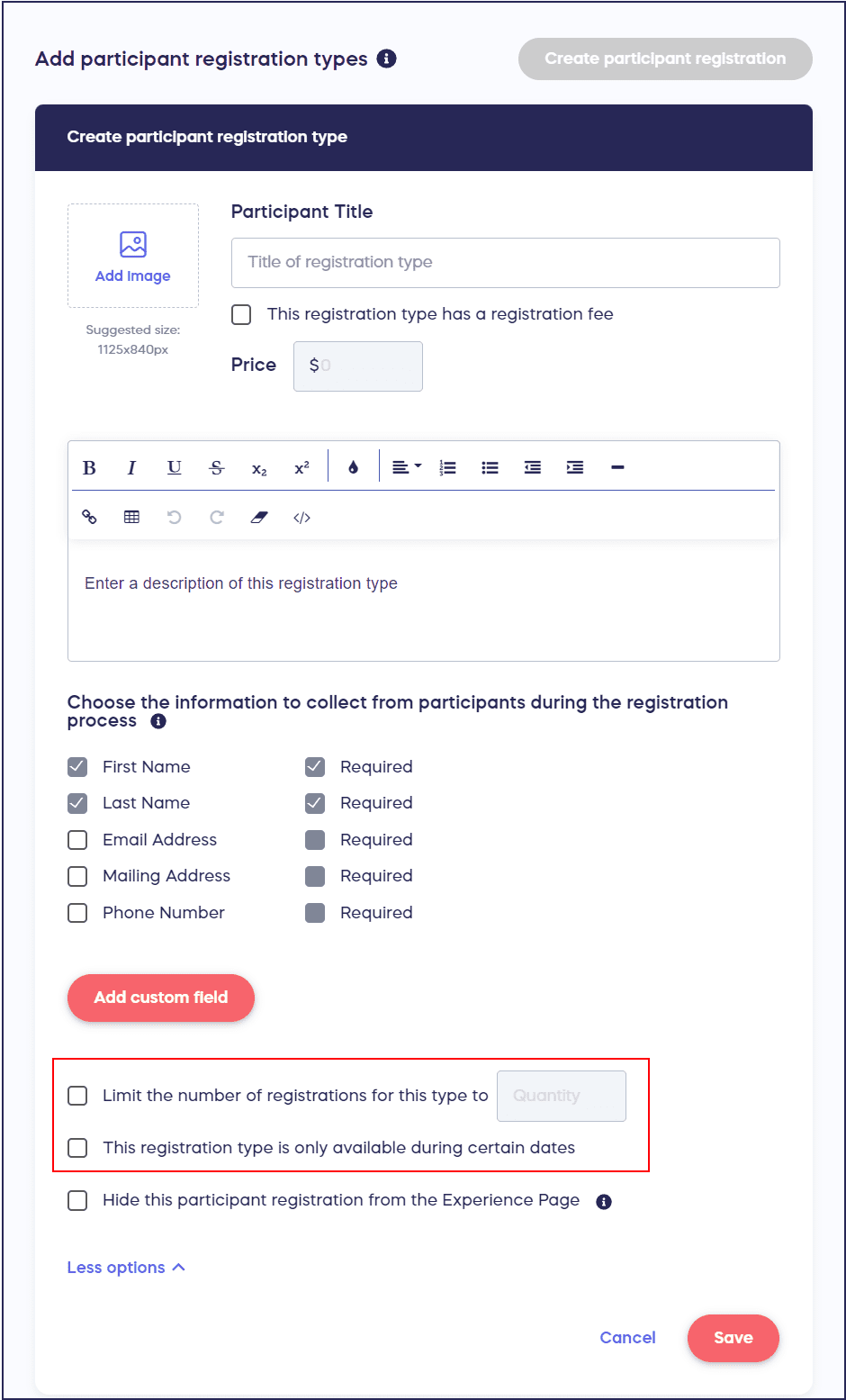
- Select Save.
You can also add waivers or custom forms to your registration options by following the instructions in How to Add a Waiver or Form to Peer-to-Peer or A-Thon Registration Options.
Frequently Asked Questions
Can I combine time limits and quantity limits on the same registration option?
Yes, you can apply both time and quantity limits to a single registration option. For example, you could offer early bird pricing that’s available only for the first two weeks AND limited to the first 100 registrants. Whichever limit is reached first will close that registration option. This dual-limit approach creates maximum urgency by combining the scarcity of both time and availability.
What happens to a time-limited option after the deadline passes?
Once the end date and time for a limited-time registration option passes, that option automatically disappears from your Campaign Page. Potential Participants will no longer see it as an option during registration. However, anyone who registered during the available window retains their registration at that price or with those benefits—existing registrations are not affected when the option closes.
What do visitors see when a quantity-limited option sells out?
When a quantity-limited registration option reaches its maximum number of registrants, the option remains visible on your Campaign Page but becomes unavailable for purchase. It typically displays as “Sold Out” or shows that the maximum capacity has been reached. This visibility serves as social proof, showing potential Participants that the opportunity was in demand and encouraging them to register for other available options before those also sell out.
Can I edit the time or quantity limits after creating the registration option?
Yes, you can edit time and quantity limits even after the registration option is live. Access your Campaign Setup, navigate to the Peer-to-Peer section, and edit the existing registration option to adjust the start date, end date, or maximum quantity. This flexibility allows you to extend popular offers, increase quantity limits if demand exceeds expectations, or adjust timing based on Campaign performance.
Should I announce limited-time or limited-quantity offers in advance?
Announcing limited offers in advance can build anticipation and drive registrations as soon as the offer becomes available. However, surprise flash sales can also be effective for re-engaging audiences during slower registration periods. Consider your Campaign goals and audience—advance announcements work well for major launches, while surprise offers can create excitement mid-campaign when momentum needs a boost.
How do limited registration options affect Team registrations?
Limited-time and limited-quantity settings work the same way for Team registrations as they do for individual Participant registrations. You can create Team registration options with time windows or capacity limits, which can be particularly effective for corporate challenge events or large group participation. When a Team registration option reaches its limit or deadline, new Teams cannot register under that option, but existing Teams remain unaffected.
Can I create multiple limited registration options at different price points?
Yes, you can create multiple registration options with different limits, pricing, and benefits. For example, you might offer a super early bird rate for the first 50 registrants or first two weeks, a regular early bird rate for the next 100 registrants or next month, and then standard pricing without limits. This tiered approach maximizes both early registrations and overall participation by offering multiple opportunities at different value levels.