Edit, delete, or hide the entry levels for your Raffle or Sweepstakes.
You can change your Raffle or Sweepstakes entry levels, but what you can change depends on the entry type and whether entries have been purchased. There are three types of entry levels: Basic Entry Levels (entry levels without merchandise or impact designation), Impact Levels, and Merch Levels. Each type has different rules for editing, deleting, and hiding.
Before You Begin
We recommend making sure your entry levels are set up exactly as you want them before publishing your fundraiser. You can preview your fundraiser at any time before publishing. The rules below explain what changes are possible at each stage.
Basic Entry Levels
Basic Entry Levels are the standard entry option without merchandise or impact designation.
Before any entries are purchased (Draft or Live):
You can edit or delete Basic Entry Levels freely. You can change the number of entries (chances to win) for each level, as well as the donation amount for each. Basic Entry Levels cannot be hidden.
To edit or delete a Basic Entry Level:
- Go to Account Navigation in the left menu and select Campaigns.
- If you have chosen a list view, click on the Campaign title. If you have chosen a grid view, click on the Campaign image.
- Select Campaign Setup.
- Go to Raffle/Sweepstakes in the timeline at the top.
- Scroll down to Set the number of entries for each donation amount.
- Find the entry level you want to edit or delete and select Edit or Delete:
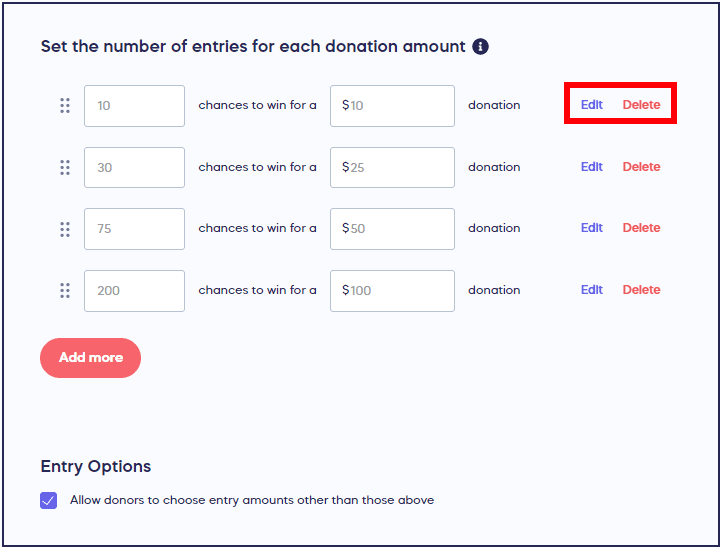
- Select Save.
After entries are purchased:
Once someone has purchased entries at a Basic Entry Level, it becomes fully locked. You cannot edit, delete, or hide a Basic Entry Level after entries have been purchased. The Edit and Delete buttons will become disabled (grayed out) and you will not be able to click on them.
Impact Levels and Merch Levels
Impact Levels and Merch Levels are enhanced entry levels that include images, descriptions, and optionally merchandise.
Before any entries are purchased (Draft or Live):
You can edit, delete, or hide Impact Levels and Merch Levels freely. You can change the price, number of entries, description, and images. You can also hide an Impact Level or Merch Level from your Campaign Page and unhide it later when you are ready.
To edit or delete an Impact Level or Merch Level:
- Go to Account Navigation in the left menu and select Campaigns.
- If you have chosen a list view, click on the Campaign title. If you have chosen a grid view, click on the Campaign image.
- Select Campaign Setup.
- Go to Raffle/Sweepstakes in the timeline at the top.
- Scroll down to Set the number of entries for each donation amount.
- Find the Impact Level or Merch Level you want to edit or delete and select Edit or Delete.
- Select Save.
To hide or unhide an Impact Level or Merch Level:
- Follow steps 1 through 5 above.
- Select Edit on the Impact Level or Merch Level you want to hide.
- Select More options.
- Use the hide setting to hide the level from your Campaign Page, or remove it to unhide the level.
- Select Save.
After entries are purchased:
Once someone has purchased entries at an Impact Level or Merch Level, the following rules apply:
- Edit: You can still edit the description and images, but you cannot change the price or number of entries.
- Delete: No. You cannot delete an Impact Level or Merch Level after entries have been purchased.
- Hide: Yes. You can still hide and unhide Impact Levels and Merch Levels even after entries have been purchased. Any purchases already made will still count towards the drawing and will not be deleted.
Quick Reference: Edit, Delete, and Hide by Entry Type
| Action | Basic Entry Levels (before purchase) | Basic Entry Levels (after purchase) | Impact/Merch Levels (before purchase) | Impact/Merch Levels (after purchase) |
|---|---|---|---|---|
| Edit | Yes (all fields) | No (fully locked) | Yes (all fields) | Partial (description and images only; price and number of entries are locked) |
| Delete | Yes | No | Yes | No |
| Hide | No (cannot be hidden) | No (cannot be hidden) | Yes | Yes (purchases still count) |
Frequently Asked Questions
Can I change the price of an entry level after someone has purchased it?
No. For all entry types (Basic Entry Levels, Impact Levels, and Merch Levels), the price cannot be changed once someone has purchased entries at that level. For Basic Entry Levels, the entire entry level becomes locked. For Impact Levels and Merch Levels, only the price and number of entries are locked, but you can still edit the description and images.
Can I hide a Basic Entry Level?
No. Basic Entry Levels cannot be hidden. Only Impact Levels and Merch Levels can be hidden. If you need the ability to hide an entry level, consider creating an Impact Level or Merch Level instead.
Can I hide an Impact Level or Merch Level after entries have been purchased?
Yes. You can hide and unhide Impact Levels and Merch Levels at any time, even after entries have been purchased. Any purchases already made at a hidden level will still count towards the drawing and will not be deleted. Hiding only prevents new purchases from being made at that level.
Why are the Edit and Delete buttons grayed out?
The Edit and Delete buttons become disabled (grayed out) when someone has purchased entries at that level. For Basic Entry Levels, this means the entry level is fully locked. For Impact Levels and Merch Levels, you can still edit the description and images by selecting Edit, even though some fields will be locked.
What can I change about my entry levels?
For Basic Entry Levels, you can change the number of entries (chances to win) and the donation amount, as long as no one has purchased entries at that level yet. Once purchased, Basic Entry Levels are fully locked. For Impact Levels and Merch Levels, you can change the price, number of entries, description, and images before purchase. After purchase, you can still edit the description and images, but the price and number of entries are locked.