
Learn how to pass Platform Fees, payment processing fees, and convenience fees on to donors using RallyUp’s Flex pricing option for Campaigns and Donation Pages.
How to Pass Campaign and Donation Page Fees on to Donors
RallyUp’s Flex pricing gives nonprofits multiple options to pass fundraising fees on to donors, helping you keep more of what you raise for your cause. You can add convenience fees, ask donors to cover Platform and processing fees, or enable Donor Tipping—all customizable to match your organization’s fundraising strategy. This guide walks through every fee-passing option available for both Campaigns and Donation Pages.
Estimated time to complete: 5-10 minutes per Campaign or Donation Page
Before You Begin
Prerequisites:
- Your organization must be using Flex pricing (fee-passing is not available with Free pricing)
- You should have already created your Campaign or Donation Page
- You’ll need admin access to your Campaign
Important recommendation: Select only one way to pass fees on to donors. While donors are typically willing to help cover fundraising costs, using multiple surcharges simultaneously (convenience fee + required Platform Fee + tipping) may frustrate donors and reduce conversion rates.
→ Learn more: Understand RallyUp Pricing Options
What fees can I pass on to donors?
Short answer: With Flex pricing, you can pass on three types of fees: RallyUp’s Platform Fee (Campaigns only), payment processing fees from Stripe or PayPal, and custom convenience fees that you set.
Detailed explanation: RallyUp’s fee structure includes multiple components that you can customize:
RallyUp’s Platform Fee covers the cost of operating the fundraising platform instead of relying on voluntary donor tips. This fee only applies to Campaigns, not Donation Pages.
Payment processing fees are standard charges from Stripe or PayPal for processing credit cards, debit cards, and other payment methods. RallyUp does not profit from these fees—they go entirely to the payment processor.
Convenience fees are optional surcharges you can add to offset any fundraising costs. You control the amount (flat rate or percentage) and donors cannot opt out.
→ Learn more: Understand Debit and Credit Card Processing Fees
How does fee coverage work?
Each fee type offers different coverage options:
| Fee Type | Organization Covers | Donors Required to Cover | Donors Optional Coverage | Custom Amount |
|---|---|---|---|---|
| Platform Fee (campaigns only) | ✓ Yes (default) | ✓ Yes | ✓ Yes | ✗ No |
| Payment Processing | ✓ Yes (default) | ✓ Yes* | ✓ Yes* | ✗ No |
| Convenience Fee | ✗ No | ✓ Yes | ✗ No | ✓ Yes |
| Donor Tipping | ✗ N/A | ✗ N/A | ✓ Yes | ✓ Yes |
*The payment processing fee options you can select will depend on the Platform Fee coverage options you’ve selected.
What’s the difference between platform fees and processing fees?
| Feature | Platform Fee | Payment Processing Fee |
|---|---|---|
| Who charges it | RallyUp | Stripe or PayPal |
| What it covers | Operating costs of the fundraising platform | Credit/debit card transaction costs |
| Applies to | Campaigns only | Both Campaigns and Donation Pages |
| Typical amount | 2.9%-6.9% (depending on Campaign settings) | ~2.9% + $0.30 per transaction; 501(c) organizations may qualify for a discount |
How to Add a Convenience Fee
A convenience fee is a mandatory surcharge added to each donation. Donors cannot opt out. If the convenience fee exceeds your actual costs, your organization keeps the surplus.
Step-by-step instructions:
For Campaigns:
- Go to Campaigns in the left menu.
- Click on the Campaign title (list view) or Campaign image (grid view).
- Select Campaign Setup.
- Go to Basics in the timeline at the top.
- Scroll down to Add a convenience fee to each donation.
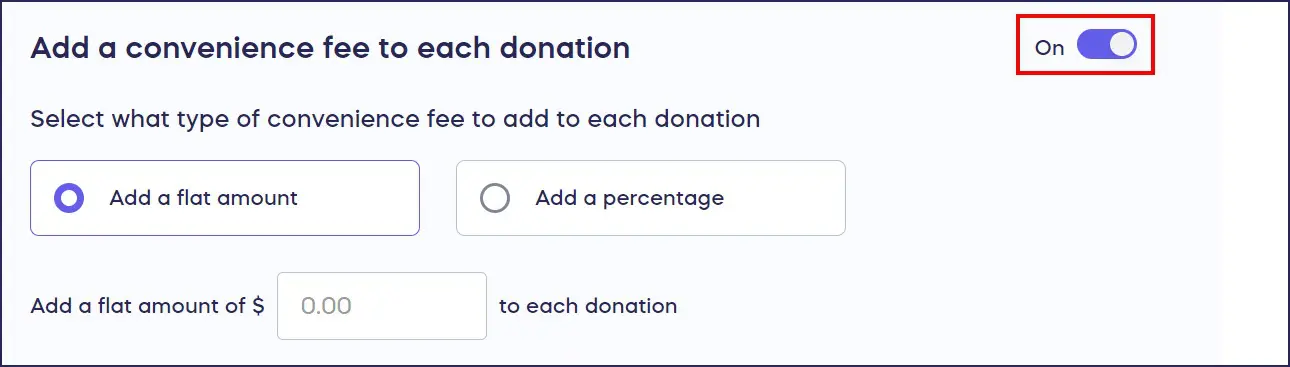
- Toggle the setting to the right (enabled position):
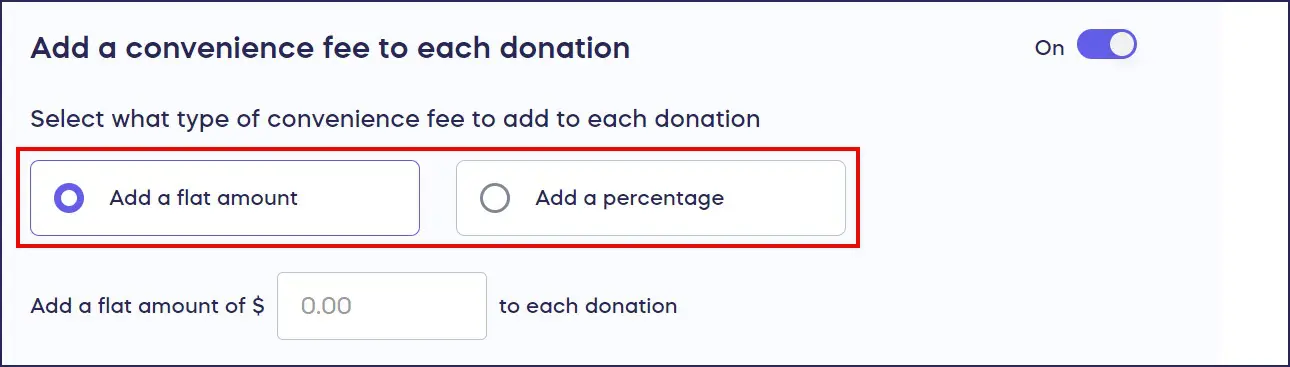
- Choose between flat amount or percentage:
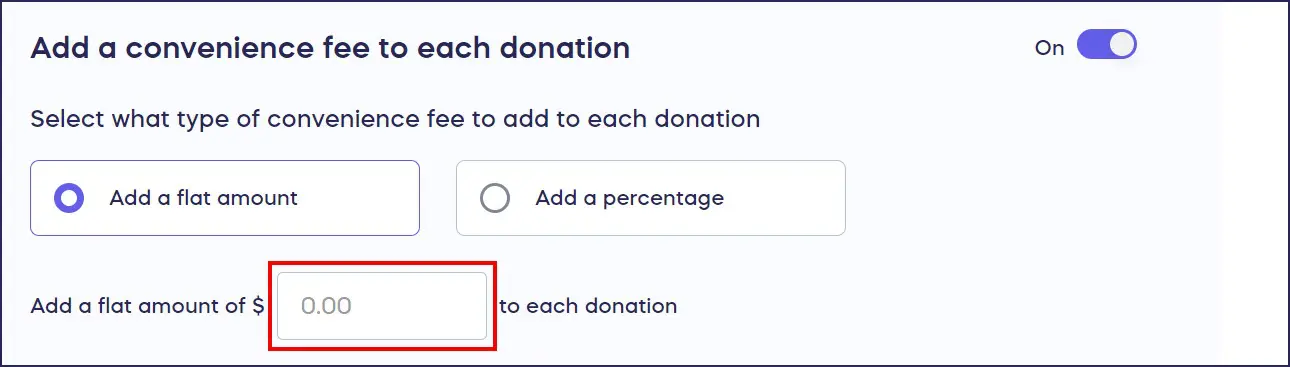
- Enter your desired amount or percentage:
- Select Save.
For Donation Pages:
- Go to Donation Pages (under Settings) in the left menu.
- Click on the Donation Page title.
- Select Donation Page Setup.
- Go to Checkout in the timeline at the top.
- Follow steps 5-9 above.
What happens next:
The convenience fee will automatically appear at checkout for all donors. The fee displays as a separate line item so donors understand it’s being added to their donation amount.
How to Manage Platform Fee Coverage (Campaigns Only)
Platform Fees only apply to fundraising Campaigns. Donation Pages never incur a Platform Fee, even with Flex pricing.
Option 1: Have Your Organization Cover the Platform Fee
When to use this: Choose this option if you want donors to see only their donation amount without any additional charges. The fee will be automatically deducted from funds raised.
Instructions:
- Go to Campaigns in the left menu.
- Click on the Campaign title (list view) or Campaign image (grid view).
- Select Campaign Setup.
- Scroll down to Would you like to pass the Platform Fee on to donors?
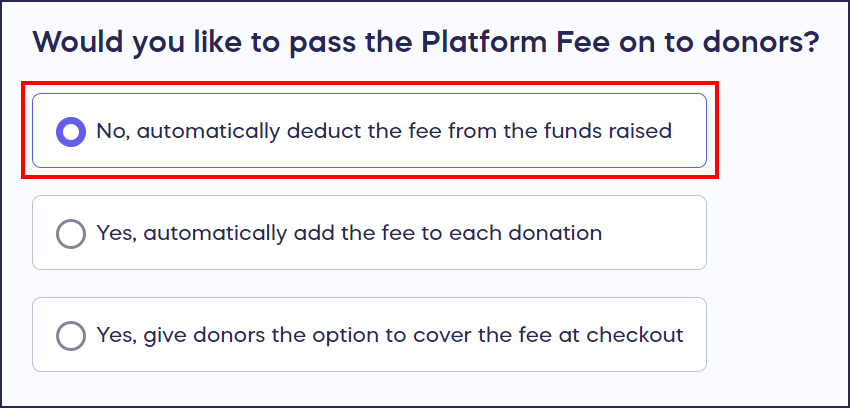
- Select No, automatically deduct the fee from the funds raised:
- Select Save.
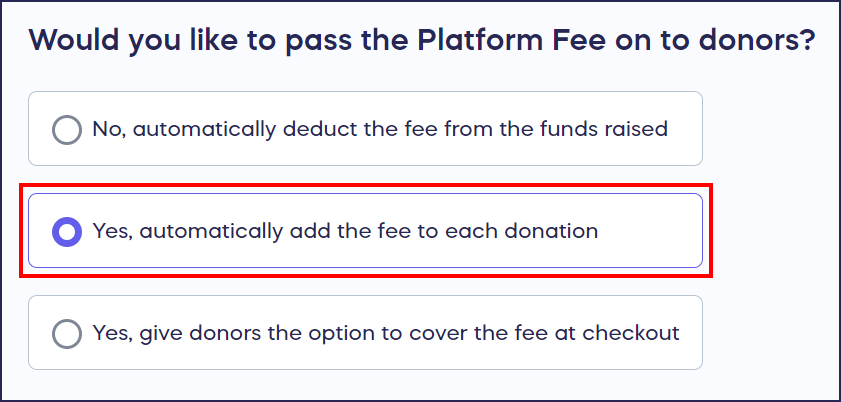
Option 2: Require Donors to Cover the Platform Fee
When to use this: Choose this if you want to maximize funds raised and need donors to cover all fees without the option to decline.
Instructions:
- Go to Campaigns in the left menu.
- Click on the Campaign title (list view) or Campaign image (grid view).
- Select Campaign Setup.
- Scroll down to Would you like to pass the Platform Fee on to donors?
- Select Yes, automatically add the fee to each transaction:
- Select Save.
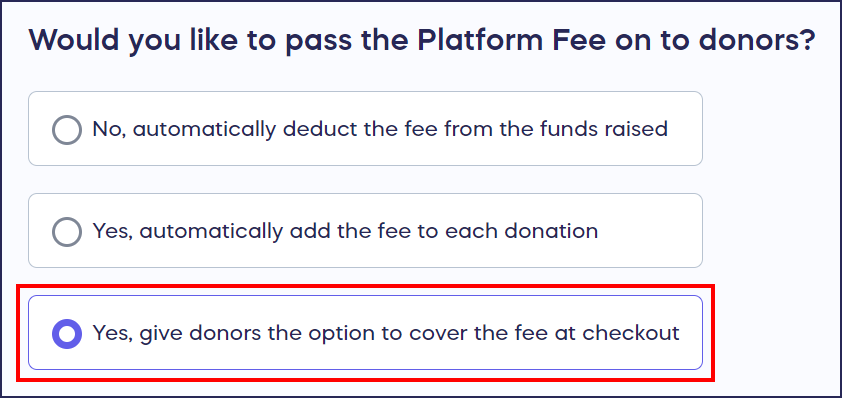
Option 3: Give Donors the Option to Cover the Platform Fee
When to use this: This balanced approach lets donors decide whether to help cover fees. If they decline, your organization pays the fee (deducted from the donation amount).
Instructions:
- Go to Campaigns in the left menu.
- Click on the Campaign title (list view) or Campaign image (grid view).
- Select Campaign Setup.
- Scroll down to Would you like to pass the Platform Fee on to donors?
- Select Yes, give donors the option to cover the fee at checkout:
- Select Save.
How to Manage Payment Processing Fee Coverage
Payment processing fees apply to both Campaigns and Donation Pages. These fees are charged by your payment processor (Stripe or PayPal), not by RallyUp.
Option 1: Have Your Organization Cover the Processing Fee (Default)
This setting is disabled by default, meaning your organization automatically covers processing fees. The fee is deducted from the donation amount you receive.
If you’ve previously enabled fee passing and want to disable it:
For Campaigns:
- Go to Campaigns in the left menu.
- Click on the Campaign title (list view) or Campaign image (grid view).
- Select Campaign Setup.
- Go to Basics in the timeline at the top.
- Scroll to Automatically add the payment processing fee to each transaction.
- Toggle the setting to the left (disabled position):

- Select Save.
For Donation Pages:
- Go to Donation Pages (under Settings) in the left menu.
- Click on the Donation Page title.
- Select Donation Page Setup.
- Go to Checkout in the timeline at the top.
- Scroll to Who will fund the payment processing fee?
- Select Automatically deduct the fee from the funds raised.
- Select Save.
Option 2: Require Donors to Cover the Processing Fee
Important note for Campaigns: This option is only available if you also require donors to cover the Platform Fee.
For Campaigns:
- Go to Campaigns in the left menu.
- Click on the Campaign title (list view) or Campaign image (grid view).
- Select Campaign Setup.
- Go to Basics in the timeline at the top.
- Scroll to Automatically add the payment processing fee to each transaction.
- Toggle the setting to the right (enabled position):

- Select Save.
For Donation Pages:
- Go to Donation Pages (under Settings) in the left menu.
- Click on the Donation Page title.
- Select Donation Page Setup.
- Go to Checkout in the timeline at the top.
- Scroll to Who will fund the payment processing fee?
- Select Automatically add the fee to each donor’s donation.
- Select Save.
Option 3: Give Donors the Option to Cover the Processing Fee
Important note for Campaigns: This option is only available if you give donors the option to cover the Platform Fee (but don’t require it).
For Campaigns:
- Go to Campaigns in the left menu.
- Click on the Campaign title (list view) or Campaign image (grid view).
- Select Campaign Setup.
- Go to Basics in the timeline at the top.
- Scroll to Include the payment processing fee when asking donors to cover the Platform Fee.
- Toggle the setting to the right (enabled position):

- Select Save.
For Donation Pages:
- Go to Donation Pages (under Settings) in the left menu.
- Click on the Donation Page title.
- Select Donation Page Setup.
- Go to Checkout in the timeline at the top.
- Scroll to Who will fund the payment processing fee?
- Select Ask donors during checkout if they will pay the fee.
- Select Save.
How to Enable Donor Tipping (Campaigns Only)
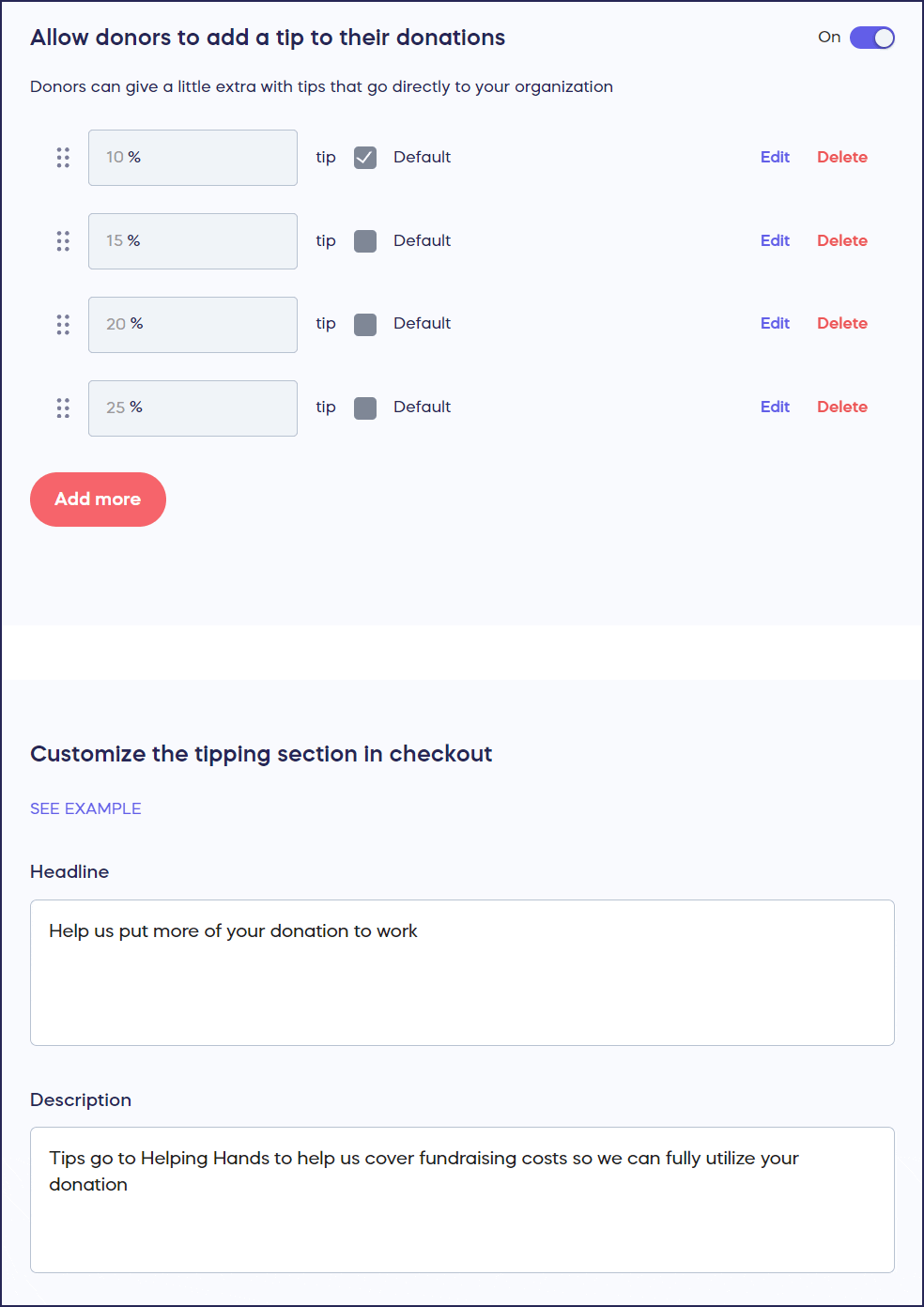
With Flex pricing, tips go directly to your organization rather than to RallyUp. Donor tipping is only available for Campaigns, not Donation Pages.
Enable Tips
- Go to Campaigns in the left menu.
- Click on the Campaign title (list view) or Campaign image (grid view).
- Go to Options in the timeline at the top.
- Select Pricing Options.
- Scroll down to Allow donors to add a tip to their donations.
- Toggle the setting to the right (enabled position):

- Customize the tipping options, headline, and description:
- Select Save.
Disable Tips
- Go to Campaigns in the left menu.
- Click on the Campaign title (list view) or Campaign image (grid view).
- Go to Options in the timeline at the top.
- Select Pricing Options.
- Scroll down to Allow donors to add a tip to their donations.
- Toggle the setting to the left (disabled position):

- Select Save.
When should I use each fee-passing option?
If you want maximum transparency and simplicity, then use convenience fees with a clear flat amount that covers your costs.
If you need to maximize funds raised and have donor support, then require donors to cover both platform and processing fees.
If you want to respect donor choice while encouraging fee coverage, then give donors the option to cover fees at checkout.
If you prefer a softer ask that feels voluntary, then enable donor tipping and customize the messaging to explain how tips support your mission.
If your donors are price-sensitive or you’re worried about conversion rates, then have your organization cover all fees and use other fundraising strategies to offset costs.
Can I use multiple fee-passing methods at once?
Short answer: Yes, technically you can enable multiple methods, but we strongly recommend choosing only one approach to avoid donor confusion and frustration.
Detailed explanation: While RallyUp allows you to combine different fee-passing options, using multiple surcharges can negatively impact donor experience and reduce conversion rates. For example, adding a convenience fee + requiring Platform Fee coverage + enabling tipping creates multiple “asks” at checkout.
Best practice is to select the single method that best aligns with your donor base and fundraising goals.
What happens to fees if a donation is refunded?
When you process a refund, the Platform Fee and payment processing fee are not returned to your organization. The donor receives their full donation amount back (including any fees they covered), but your organization is responsible for all associated fees.
This is standard across all payment processing platforms and applies whether donors covered the fees initially or your organization did.
Frequently Asked Questions
Can I change fee settings after my campaign has started?
Yes, you can modify fee settings at any time during your campaign. Changes will apply to all new donations but won’t affect donations already processed. Previously completed transactions retain their original fee structure.
Do payment processing fees apply to offline donations?
No, payment processing fees only apply to online transactions processed through Stripe or PayPal. Offline donations added manually to your campaign don’t incur processing fees.
Will donors see exactly how much each fee is?
Yes, when donors are asked to cover fees, the checkout page displays a line-by-line breakdown showing their donation amount, Platform Fee, processing fee, and total charge. This transparency helps donors understand where their money is going.
Can I customize the language that asks donors to cover fees?
For Donor Tipping, yes—you can fully customize the headline and description. For Platform and processing fee coverage, RallyUp provides standardized language, but the presentation clearly explains what donors are being asked to cover.
Does enabling fee coverage reduce donation amounts?
Research shows mixed results. Some donors appreciate transparency and willingly cover fees, while others may reduce their intended donation amount to compensate for added fees. Testing different approaches with your specific donor base is recommended.
How do convenience fees compare to required fee coverage?
Convenience fees are simpler to understand—a flat amount or percentage added to every donation. Required fee coverage is more transparent, showing donors the actual platform and processing costs. Choose convenience fees if you want simplicity, or required fee coverage if you want full transparency.
What percentage of donors typically agree to cover fees?
Industry data suggests 60-80% of donors will opt to cover fees when given the choice, though this varies significantly by organization type, donor demographic, and how the request is presented. Organizations that explain how fee coverage helps their mission generally see higher opt-in rates.
Troubleshooting
I can’t find the payment processing fee toggle.
If you’re working on a campaign and can’t see payment processing fee options, then check your Platform Fee coverage settings first. Payment processing fee passing is only available when certain Platform Fee coverage options are selected.
The convenience fee isn’t showing at checkout.
If the convenience fee you set isn’t appearing, then verify you clicked Save after enabling it.
Donors are complaining about multiple fees.
If donors are expressing frustration about fees, then you may have multiple fee-passing methods enabled. Review your settings and disable all but one method to simplify the checkout experience.
Related Features
You can test your entire Campaign, including checkout flow, before you go live so you can see how fees appear to donors:
→ Learn more: How to Preview Your Campaigns in Draft Mode
Before setting up fee coverage, you may want to understand payment processing costs. See: Understand Debit and Credit Card Processing Fees
Key Takeaways
Bottom line: RallyUp’s Flex pricing gives you complete control over how fundraising fees are handled. Choose one primary method—convenience fees, required fee coverage, optional fee coverage, or donor tipping—and configure it to match your organization’s needs and donor expectations. Avoid using multiple fee-passing methods simultaneously to maintain a smooth donor experience and maximize conversion rates.
Action items:
- ✓ Choose one fee-passing method that aligns with your donor base
- ✓ Test your checkout flow to see how fees appear to donors
- ✓ Communicate transparently about where fees go in your campaign description
- ✓ Monitor conversion rates after enabling fee coverage to assess impact