
Learn which settings can and can’t be changed once you’ve published your Campaign.
After your Campaign is published, you’ll still be able to make edits to most settings. However, there are a few structural settings that cannot be changed once your Campaign has been published.
What Campaign settings can’t be changed after publishing?
- Organization receiving the funds
- Campaign primary currency
- Campaign pricing
- Adding/removing Fundraising Activities
- Raffle entry type (any prize vs. specific prizes)
- Peer-to-Peer registration type (private vs. public)
- Entry levels (if entries have been purchased at that level)
- Auction bidding style
How do I update my Campaign after publishing?
- Go to Campaigns in the left menu.
- If you have chosen a list view, click on the Campaign title. If you have chosen a grid view, click on the Campaign image.
- Select Campaign Setup*.
- Make your desired changes, then select SAVE. If a setting isn’t editable, it will appear greyed out:
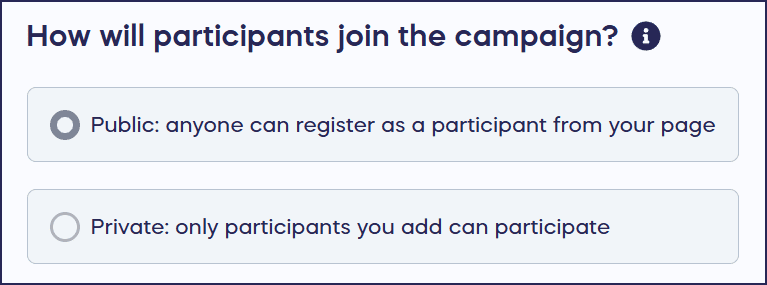
*Terminology may differ according to Campaign settings.
What should I know before publishing my Campaign?
- You can always preview and test out your Campaign before publishing: How-to: Preview Your Campaigns in Draft Mode.
- You can also share your draft Campaign with others and get a second opinion: How-to: Show Someone Your Campaign Before It Starts.
- Once items have been bid on or entry levels have been purchased, that item or entry level cannot be deleted. You might want to consider hiding it instead.
Frequently Asked Questions
Can I change my Campaign pricing after publishing?
No, you cannot change your Campaign pricing (Free pricing or Flex pricing) after your Campaign is published. This is one of the structural settings that must be decided before you go live, so be sure to review your pricing choice carefully during setup.
What happens if I need to change a setting that’s locked after publishing?
If you need to modify a locked setting like your primary currency, organization, or pricing model, you’ll need to create a new Campaign with the correct settings. Consider using Draft Mode to thoroughly test your Campaign before publishing to avoid this situation.
Can I add new Components to my Campaign after it’s published?
No, you cannot add or remove fundraising Components (such as Raffle, Sweepstakes, or Silent Auction) after your Campaign is published. Plan your Campaign structure carefully and include all desired Components before going live.
Can I delete Raffle entry levels or Auction items after people have purchased them?
No, once entry levels have been purchased or Auction items have received bids, they cannot be deleted. However, you can hide these items from your Campaign Page if you need to remove them from public view while preserving the transaction history.
How do I preview my Campaign before publishing to avoid locked settings?
You can preview and test your Campaign in Draft Mode before publishing, which allows you to review all settings and make changes freely. You can also share your draft Campaign with team members to get feedback before going live, ensuring everything is configured correctly.