
Offer discounts to generate more donations.
RallyUp allows you to use promo codes to incentivize donors and raise more funds. Promo codes can be used to offer discounts on:
- Raffle entry levels (promo codes are not available for Sweepstakes)
- Ticketing & Registration Tickets and Tables
- Storefront items
- Crowdfunding Perks
- Peer-to-Peer and A-Thon registration fees
How do promo codes work?
Promo code discounts can be a percentage amount (e.g., 25% off) or a flat amount (e.g., $25 off). They can apply to the entire transaction or towards one specific item. RallyUp also offers several other customization options to ensure your promo codes fit your unique goals:
- Code name: Enter your own code (e.g., 25OFF) or have our random generator create one for you.
- Number of times code can be used: Specify how many times each code can be used (e.g., a quantity of 50 means that code 25OFF can be used only 50 times). You can also decide whether each donor will have the option to use the code only once or for multiple purchases.
- Limited time: Allow the promo code to be available for a limited time only. If a donor tries to enter it outside the designated window, they will see an error message. If you prefer to have the code available for the entire duration of the Campaign, no dates are necessary.
How do I add a promo code?
- Go to Campaigns in the left menu.
- If you have chosen a list view, click on the Campaign title. If you have chosen a grid view, click on the Campaign image.
- Select Manage Promo Codes.
- Select CREATE PROMO CODE.
- Fill out the code details:
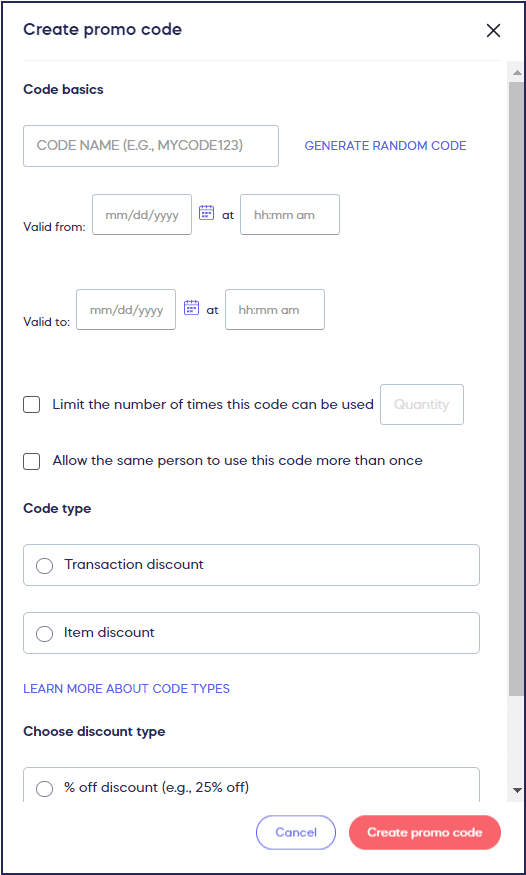
If you don’t want to add limited time dates or limit the number of times a code can be used, you can leave those fields blank.
- Select Create promo code.
How do I edit or delete a promo code?
- Go to Campaigns in the left menu.
- If you have chosen a list view, click on the Campaign title. If you have chosen a grid view, click on the Campaign image.
- Select Manage Promo Codes.
- Hover your mouse over the code you want to edit or delete and click on the three-dot menu on the right:
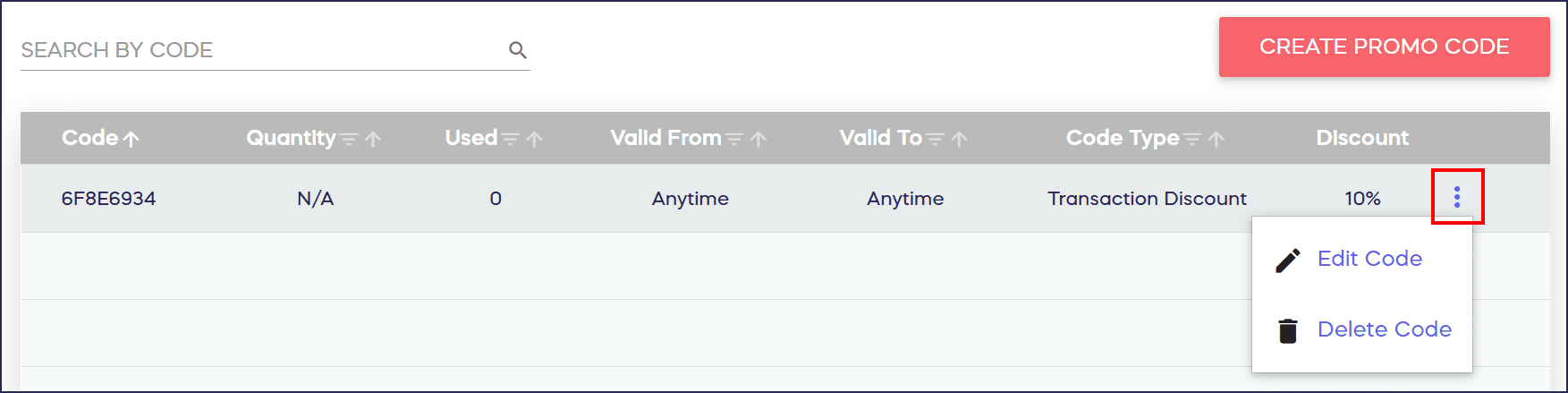
- Select Edit Code or Delete Code.
What else should I know about promo codes?
- Promo codes cannot be deleted after they are used. However, you can still change the dates and number of times the code can be used are if the code has already been used.
- The total amount raised will reflect the transaction amount minus the discount. For example, a $100 transaction with a $20 discount promo code applied means that $80 will be added to the total amount raised.
- Reports will show columns for transaction amounts before the discount, transaction amounts after the discount, and the amount of the discount itself. Reports will also have a Promo Code column that will show which promo code was used on a specific transaction (if any).
Frequently Asked Questions
What Campaign types support promo codes?
Promo codes can be used for Raffle entry levels, Ticketing & Registration Tickets and Tables, Storefront items, Crowdfunding Perks, and Peer-to-Peer and A-Thon registration fees. Note that promo codes are not available for Sweepstakes.
Can I offer both percentage and dollar amount discounts?
Yes, promo code discounts can be either a percentage amount (e.g., 25% off) or a flat dollar amount (e.g., $25 off). You can choose which type works best for your promotion.
Can I limit how many times a promo code is used?
Yes, you can specify how many times each promo code can be used overall. You can also decide whether each donor can use the code only once or for multiple purchases.
Can I create time-limited promo codes?
Yes, you can set start and end dates for your promo codes. If a donor tries to use the code outside the designated time window, they’ll see an error message. If you prefer the code to be available for the entire Campaign, you can leave the date fields blank.
Can I delete a promo code after it’s been used?
No, promo codes cannot be deleted after they’ve been used. However, you can still edit the dates and the number of times the code can be used even after it’s been applied to transactions.
How do promo codes affect my total amount raised?
The total amount raised reflects the transaction amount minus the discount. For example, a $100 transaction with a $20 discount means $80 is added to your total amount raised.
Will reports show promo code usage?
Yes, reports include columns for transaction amounts before the discount, transaction amounts after the discount, the discount amount itself, and which promo code was used on each transaction.
Can I apply a promo code to an entire transaction or just one item?
You can configure promo codes to apply to the entire transaction or towards one specific item, giving you flexibility based on your promotional goals.